Senja Template: Crafting Cohesive Visual Narratives
There’s a particular kind of frustration that sets in when you’re staring at a blank presentation slide deck, knowing you have a brilliant idea but lacking the visual framework to support it. We’ve all been there—cobbling together mismatched graphics, wrestling with alignment, and trying to force a color palette that just doesn’t want to cooperate. For designers, entrepreneurs, and content creators, the gap between a conceptual vision and a polished, professional delivery often comes down to the tools we use. This is where a robust asset like the Senja Power Point Template steps in, not just as a set of slides, but as a comprehensive system for visual communication.
A System Built for Visual Consistency
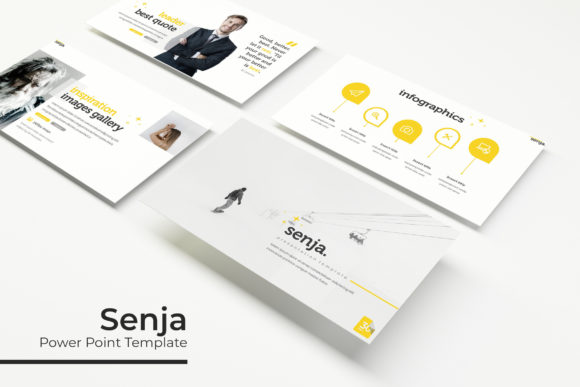
At its core, the Senja template is about solving the problem of inconsistency. With 150+ total slides organized into five distinct premade color schemes—each containing 30 meticulously designed slides—it provides a structured playground for your ideas. Imagine having a consistent visual language at your fingertips, one that you can adapt to different brand moods or project phases without starting from scratch. The five color variations aren’t just random palettes; they are thoughtfully curated to evoke different atmospheres, allowing you to align your presentation’s tone with your message, whether it’s energetic and modern or calm and authoritative.
The real value for a small business owner or marketer lies in the time saved and the professionalism gained. Instead of spending hours trying to align text boxes and choose complementary colors, you can focus on refining your narrative. The pixel-perfect illustrations and handcrafted infographics are designed to be both beautiful and functional, turning complex data into digestible, engaging visual stories. This isn’t about slapping content onto pretty slides; it’s about having a framework that elevates your content’s clarity and impact.
From Slideshows to Brand Ecosystems
While the primary function is presentations, a versatile template like this transcends its initial purpose. Think of the Senja slide deck as a springboard for broader brand identity work. The section break slides, gallery layouts, and portfolio showcases can be repurposed into powerful visual assets. A graphic designer might extract the infographic elements to create social media graphics, ensuring a seamless look between a client presentation and their Instagram feed. An entrepreneur could use the clean, master slide-based layouts as inspiration for website hero sections or digital product mockups.
The inclusion of resizable and editable graphics with picture placeholders that support drag-and-drop functionality is a practical game-changer. It means you can quickly personalize the template with your own photography or client logos, maintaining that hard-won visual consistency across all touchpoints. This adaptability makes it more than a presentation tool; it becomes a foundational element of your creative toolkit, useful for everything from internal reports to client-facing marketing proposals. The ability to edit every graphic element ensures your brand’s unique assets are never compromised.
Practical Integration and Workflow Efficiency
For the busy creative juggling multiple projects, workflow efficiency is non-negotiable. The Senja template is built on master slides, a feature that might sound technical but is fundamentally about simplicity. It means that a change made to a master layout automatically updates throughout the entire deck, ensuring uniformity. This is crucial for maintaining a professional standard, especially when working on lengthy presentations or collaborating with a team. The included PPTX files for both standard and widescreen formats cover the most common presentation scenarios, while the Google Slides template version offers cloud-based flexibility for real-time collaboration.
A practical tip for anyone adopting this template: spend the first 15 minutes familiarizing yourself with the structure. Identify which of the five color schemes best suits your current project. Look at the library of 30 slides per color and map out your content flow before you even begin typing. Are you leading with a powerful statement? Use a section break slide. Do you need to showcase your portfolio? There’s a dedicated layout for that. Planning your narrative using the provided framework will streamline your design process exponentially.
Remember, the template is a starting point. The real magic happens when you infuse it with your own content and brand personality. Pair the clean, modern typography of the template with your own brand fonts if needed, but be mindful of readability. The included font links are a great resource, but always test how text appears at different scales, especially for body copy. A beautiful display font for a title might become illegible in a small paragraph. The goal is a harmonious balance where design supports, rather than overshadows, your message.
Beyond the Slide Deck: Creative Applications
The versatility of the Senja assets opens up numerous creative applications. A blogger could adapt the gallery slide layouts to create compelling Pinterest pins or blog header graphics. A marketing professional might use the infographic templates to develop standalone visual reports or e-book sections. The clean, modern aesthetic is particularly well-suited for digital products, allowing creators to design professional-looking worksheets, checklists, or online course materials that feel cohesive and trustworthy.
Even in print, the principles hold. The design language within the template can inform the layout of a one-page brochure, a product packaging insert, or an event invitation. The key is to think of the template not as a rigid container, but as a library of design principles and layouts that can be deconstructed and reapplied. The section break slides, for instance, can become stunning poster designs, while the portfolio layouts could be reworked into a lookbook for a small product line.
Ultimately, investing in a high-quality template like Senja is an investment in your presentation’s credibility. In a world where first impressions are increasingly visual, the ability to deliver information in a polished, organized, and aesthetically pleasing manner is a significant competitive advantage. It signals professionalism and attention to detail, qualities that resonate with clients, investors, and audiences alike. Whether you’re pitching a new business idea, teaching a workshop, or showcasing your creative work, having a reliable visual foundation allows your expertise and passion to shine through without the distraction of clunky design. It’s about removing the friction between your idea and its beautiful, effective presentation.