Dolce Google Slides: A Complete Template for Modern Storytelling
Imagine walking into a client meeting or pitching your latest project with a presentation that feels cohesive, professional, and undeniably polished. You don’t need to spend hours tweaking text boxes or hunting for the perfect icon; you simply open a file, drag in your content, and the design does the heavy lifting. This is the promise of a robust design asset like the Dolce Google Slide Template. In a digital landscape where visual communication is paramount, having a structured yet flexible foundation for your slide decks can be the difference between a confused audience and a captivated one.
Understanding the Scale and Versatility of 150+ Slides
The most immediate feature that sets this resource apart is sheer volume and variety. With over 150 total slides built into the framework, you aren't just buying a single presentation; you are acquiring a library of visual communication tools. The structure is built on five premade color themes, offering 30 distinct slides for each template variation. This is crucial for brand consistency. Whether you are a small business owner adhering to strict brand guidelines or a freelancer needing to adapt to different client palettes, the ability to switch between five distinct color schemes allows for instant customization without compromising the integrity of the design.
For those who dread the "blank page syndrome," this variety is a lifesaver. You might be preparing a quarterly marketing report, a portfolio review, or a product launch strategy. Instead of starting from scratch, you can select a layout that matches your content needs—be it a data-heavy comparison chart or a minimalist image showcase. The inclusion of section break slides also helps in organizing complex narratives, ensuring your audience can follow the logical flow of your argument without getting lost in a sea of bullet points.
Visual Storytelling: Infographics, Portfolios, and Pixel-Perfect Design
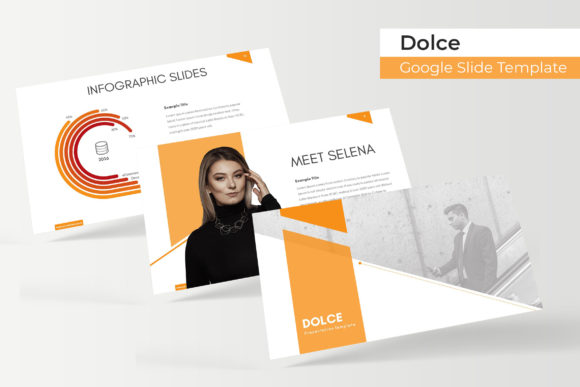
Modern audiences process visual information faster than text. Recognizing this, the Dolce Google Slide Template places a heavy emphasis on visual assets. The handcrafted infographics are particularly valuable for anyone in marketing or data analysis. Instead of generic clip art, these are designed to convey complex information—timelines, workflows, statistical breakdowns—in a way that is both aesthetically pleasing and easy to digest.
Beyond data, the template excels in showcasing work. The dedicated gallery and portfolio slides are designed for high-impact visuals. If you are a photographer, interior designer, or UI/UX developer, your work needs to breathe. These layouts provide ample white space and strategic framing to let your images speak for themselves. Furthermore, the "pixel-perfect illustrations" ensure that even on the largest conference room screens, your graphics remain sharp and professional, avoiding the blurry artifacts that often plague lesser design assets.
Practicality in Action: Drag-and-Drop Functionality
A beautiful design is useless if it is difficult to edit. This is where the technical build of the template becomes a practical asset for busy professionals. Based on Master Slides, the entire structure is rigid yet flexible. When a template is built on a master slide system, changing a font or moving a logo on the master automatically updates every single slide in the deck. This saves an immense amount of time and prevents the embarrassing error of having inconsistent headers or footers throughout a presentation.
The inclusion of resizable and editable graphic picture placeholders further streamlines the workflow. You don’t need to be a Photoshop wizard to insert your images. The drag-and-drop interface allows you to drop your photos directly into pre-defined shapes and frames. This is particularly useful for content creators and bloggers who need to produce visual content quickly. Whether you are creating a media kit for a brand partnership or a lecture for an online course, the friction between your idea and the final product is significantly reduced.
Beyond the Slides: Leveraging the Package for Brand Identity
While the primary function is presentation, the utility of the Dolce Google Slide Template extends into broader brand identity management. The package includes 5 PPTX files (widescreen format), which are compatible with both PowerPoint and Google Slides. This cross-platform compatibility is essential for collaborative teams where different members might prefer different software.
Think of this template not just as a slide deck, but as a toolkit for visual consistency. The typography choices included in the package—often premium fonts with free download links provided—can serve as a starting point for your wider branding. If you find a heading style within the slides that resonates with your brand voice, you can adopt that font style for your website headers or social media graphics. This creates a seamless experience for your customers; the look and feel of your pitch deck matches your Instagram feed, which matches your website.
Maximizing Impact: Tips for Customization and Usage
To get the most out of this asset, approach it with a strategy rather than just using it as a crutch. First, review the "Readme First" file included in the package. This usually contains vital information regarding licensing and font installation. Ensuring you have the correct fonts installed before opening the file prevents layout breaks and missing text issues.
Second, consider the psychology of the five color variations. Different colors evoke different emotions. A blue-toned template might be perfect for a corporate finance proposal, conveying trust and stability. A template with warmer, earthier tones might be better suited for a lifestyle brand or a wellness presentation. Don't just pick your favorite color; pick the one that aligns with the message you want to convey to your specific audience.
Finally, don’t be afraid to break the grid. While the pixel-perfect illustrations and structured placeholders are there to help, the best presentations often come from tweaking these templates to fit a unique narrative. Swap out the stock placeholders for your own team photos, change the background textures, or combine slides from different color themes to create a unique look. The goal is to use the professional foundation to elevate your own content, ensuring that your message is not just heard, but remembered.