Mount Google Slides Template: Visual Storytelling for Modern Brands
Every presentation is a story, and the difference between a forgettable slide deck and one that captivates an audience often comes down to visual consistency. You’ve seen it before—the disjointed pitch with mismatched fonts, clashing colors, and stock photos that look like they were pulled from a 2005 clipart library. It breaks trust before you even get to your key metrics. The Mount Google Slides Template was built to solve that exact problem, not by giving you a single rigid structure, but by providing a robust, adaptable system that ensures your narrative looks polished, intentional, and professional from the first slide to the last.
A System Built for Visual Harmony
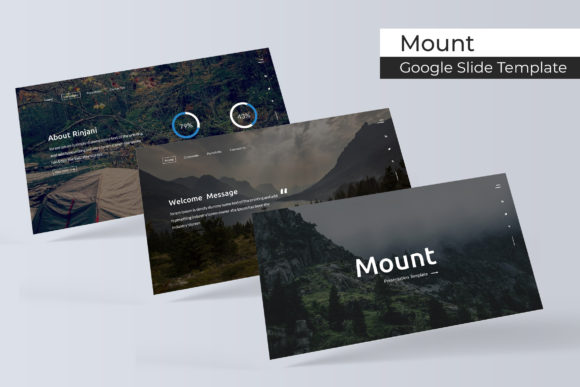
At its core, Mount is a masterclass in organized design. It ships with 150+ total slides, but the real magic is in its architecture: five distinct, premade color palettes with 30 meticulously crafted slides for each. This isn’t just about swapping a blue accent for a green one. Each color variation is a fully realized design environment—think of it as five different, cohesive brand worlds you can step into immediately. Whether you’re building a brand identity for a startup, designing a marketing report, or creating a portfolio for a creative agency, this structure eliminates the guesswork. You choose the color world that fits your project’s mood, and every slide, from section breaks to data visualizations, already speaks the same visual language.
The template’s handcrafted infographics are where practicality meets artistry. Forget generic pie charts and bar graphs. These are custom illustrations designed to make complex information digestible and engaging. Paired with pixel-perfect vector icons and resizable, editable graphics, you have the tools to turn dry data into a compelling visual argument. The drag-and-drop image placeholders, based on master slides, mean you can update visuals without breaking the layout—a huge time-saver for anyone who’s ever struggled with elements jumping around when you insert a new photo.
From Boardroom to Social Feed: Practical Applications
The true test of any design asset is its versatility. The Mount template’s clean, modern aesthetic and structured flexibility make it a workhorse for a surprising range of projects. It’s not just for quarterly business reviews.
For entrepreneurs and small business owners, it’s a branding Swiss Army knife. Use the gallery and portfolio slides to create a stunning visual catalogue for your products. The consistent color system helps reinforce brand recognition across every client touchpoint. Imagine walking into a meeting with a pitch deck that feels as polished as your website—that’s the kind of professional presentation that builds confidence and closes deals.
Content creators and marketers will find it invaluable for creating cohesive social media campaigns. Design a series of Instagram carousels or LinkedIn slides that tell a continuous story. The widescreen format is perfect for video backgrounds or webinar visuals. Because everything is based on master slides in PowerPoint (PPTX files are included alongside Google Slides compatibility), you can maintain absolute visual consistency across different team members and projects, ensuring your brand’s visual identity never wavers.
Even for personal projects—like planning a wedding, organizing a community event, or designing a digital product—the template’s structure provides a professional foundation. The section break slides are perfect for separating chapters of a story, while the portfolio layouts can beautifully showcase photography, art, or design work. The included free font links mean you can fully replicate the preview style without hunting for typefaces, making it accessible for hobbyists and professionals alike.
Making It Your Own: Design Considerations
Having a great template is step one. Using it effectively is where the real work—and the real value—happens. Here’s how to get the most out of a system like Mount.
Start with your content, not the slides. Before you even open the file, outline your key messages. What’s the single most important thing your audience should remember? Let that guide which of the 30-slide sets you choose. The bold, high-contrast palette might work for a disruptive tech startup, while a softer, muted set could be perfect for a wellness brand.
Respect the grid, but don’t be a slave to it. The master slides provide a consistent grid for alignment, which is the secret sauce behind professional-looking layouts. Use it to ensure your text boxes and images line up perfectly across slides. However, the template is designed to be edited. Swap out the placeholder graphics for your own photography or illustrations. Change the color accents to match your exact brand hex codes. The goal is to use the system as a scaffold, not a cage.
Pay attention to typography pairings. While the template includes font recommendations, understanding why they work is key. Typically, a clean sans-serif for body text ensures readability, while a distinctive serif or display font for headings adds personality. If you substitute fonts, test them at scale. A font that looks great in a headline might become illegible in bullet points. Always prioritize clarity—your audience needs to absorb the information, not decipher the typeface.
Think beyond the presentation. The individual slide designs are fantastic standalone assets. Export a single infographic slide as a PNG for a blog post. Use a text-heavy layout as the basis for a printed report. The portfolio slides can become the foundation for a PDF lookbook. This kind of asset repurposing is what gives a premium template its long-term ROI.
The Details That Define Quality
It’s the small things that often separate a good design from a great one. The Mount template includes thoughtful touches like section break slides, which are crucial for pacing a long presentation and giving your audience visual breathing room. The fact that all graphics are resizable and editable vectors means you can scale them for print or large displays without losing quality—a must for anyone creating merchandise or posters.
The inclusion of both standard and widescreen (16:9) PPTX files shows an understanding of modern use cases, from traditional projectors to YouTube videos and webinar slides. And by providing clear documentation (the Readme First file) and direct links to the free fonts used, the template respects your time, letting you move from download to creation faster.
In a digital landscape saturated with generic templates, a system like Mount stands out by offering depth, flexibility, and a genuine design sensibility. It’s a toolkit for visual storytelling that adapts to your narrative, not the other way around. Whether you’re building a brand from the ground up or refining an existing visual identity, having a cohesive, professional framework at your fingertips is not just a convenience—it’s a competitive edge.