Master Your Next Pitch with the Maze PowerPoint Template
You’ve got a brilliant idea, a game-changing product, or a quarterly report that needs to land with impact. But staring at a blank PowerPoint slide can feel paralyzing. You need more than just data; you need a narrative, a visual story that guides your audience from question to conviction. This is where a thoughtfully crafted presentation template transforms from a nice-to-have into your most powerful communication tool, ensuring your message is not just heard, but remembered.
Visual Harmony for a Cohesive Brand Story
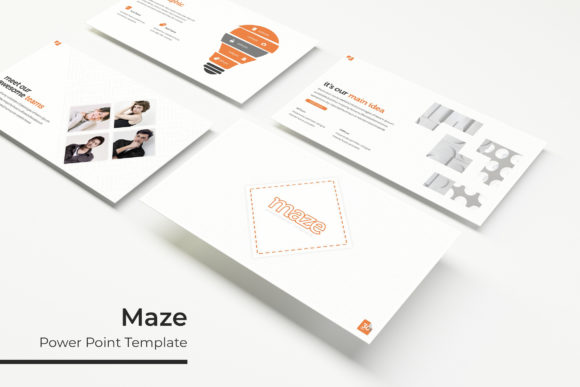
The Maze Power Point Template is engineered for clarity and visual appeal. At its core are 150+ total slides built on a foundation of pixel-perfect illustrations and handcrafted infographics. This isn't just about having a lot of slides; it's about having the right slide for every moment in your presentation. Need to showcase a complex process? There’s a flowchart slide. Highlighting key metrics? A dynamic chart slide is ready. Presenting your team or portfolio? Dedicated gallery and portfolio slides provide a clean, professional frame.
The real power for brand identity lies in its 5 premade color variations. Each color theme includes 30 meticulously designed slides, offering a complete visual system. This allows you to instantly match the template to your company's brand guidelines or a client's palette, ensuring visual consistency from the first slide to the last. Consistent use of color, typography, and layout is fundamental to building brand recognition and projecting a polished, trustworthy image.
Beyond the Slides: Practical Design Features
What makes the Maze template a practical asset for designers and marketers alike are the features that save time and reduce frustration. The entire system is based on Master Slides, a critical feature for anyone who values efficiency. Edit a logo or change a font in the master, and the update cascades through every single slide in your deck. This is a game-changer for maintaining consistency, especially when collaborating with a team.
Furthermore, the resizable and editable graphics and picture placeholders with drag & drop functionality mean you’re never locked into a static design. You can easily swap out images, adjust icon sizes, and modify shapes without breaking the layout. This flexibility is essential for creating custom presentations that feel uniquely yours, rather than a cookie-cutter template. For a small business owner or creative entrepreneur, this means spending less time wrestling with software and more time refining your message.
Strategic Applications for Maximum Impact
Think of the Maze template as a versatile canvas for your most important communications. Its applications extend far beyond a standard sales pitch.
- Brand Launch & Investor Pitches: Use the cohesive brand identity slides to tell your origin story, showcase market research with clear infographics, and present financials with confidence.
- Marketing & Content Strategy: Plan your quarterly campaigns. Outline content calendars, social media strategies, and marketing assets in a visually engaging format that gets stakeholders aligned.
- Product Showcases & Packaging Presentations: The portfolio slide layouts are perfect for displaying product lines, mockups for packaging design, or the features of a new digital product.
- Editorial & Educational Content: Bloggers and content creators can transform a popular blog post or tutorial into a downloadable PDF guide or a webinar deck, adding a new layer of professionalism to their content creation efforts.
- Internal Training & Reports: Make quarterly reviews or team training sessions more engaging. The section break slides help organize information logically, improving readability and audience retention.
For hobbyists and crafters, it can even be repurposed for creating beautiful project plans for a community group or a visual proposal for a local fair.
Getting Started: What’s in the Package
When you download the Maze template, you receive a comprehensive toolkit designed for immediate use. The package includes 5 PPTX files (one for each color theme) in both standard and widescreen formats, ensuring compatibility with various display setups. A crucial, often overlooked, component is the Readme First document. This guide typically contains important setup instructions and, most importantly, the font used in the template with a free font download link. Using the specified font is key to achieving the exact look shown in the previews.
A quick note on assets: The photographs and pictures used in the preview images are for illustration only and are not included. This is standard practice and allows you to insert your own high-quality, relevant imagery, making the presentation truly yours. Always ensure you have the proper license for any images you use.
Choosing a template like Maze is an investment in your communication strategy. It provides the professional presentation