Master Your Next Presentation with the Taftco Keynote Template
We’ve all sat through them: the presentations that feel like they were cobbled together ten minutes before the meeting, with clashing colors, inconsistent layouts, and stock images that look like they’re from 1998. Whether you’re pitching a new client, presenting quarterly results, or launching a product, your slides are the visual backbone of your message. A disjointed presentation can undermine even the most brilliant idea. That’s where a robust, well-organized template system becomes not just a convenience, but a strategic asset. The Taftco Keynote Template isn't just a single set of slides; it's a comprehensive design toolkit built for professionals who need to communicate with clarity and visual impact, every single time.
Beyond a Single Slide Deck: A System for Visual Consistency
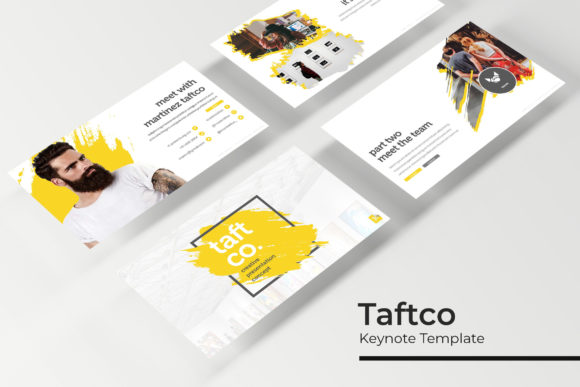
What immediately sets the Taftco system apart is its scale and structure. Instead of one monolithic file, you get five distinct, premade color themes. Each theme contains 30 meticulously crafted slides, culminating in over 150 total slides. This isn't about having more slides for the sake of it. It’s about having the right slide for every possible need within a consistent visual framework. Need a data-heavy comparison? There’s a slide for that. A team introduction? Covered. A powerful section break to signal a shift in topic? It’s there, designed with pixel-perfect precision.
This approach solves a major pain point for brand managers, marketing teams, and entrepreneurs: maintaining visual consistency across all communications. By using the master slides as your foundation, every piece of your presentation—from the title card to the thank-you slide—automatically adheres to your chosen color palette and design language. This eliminates the guesswork and the endless tweaking of individual elements, ensuring your brand identity shines through uniformly. The result is a presentation that feels cohesive, professional, and intentional, which significantly boosts audience trust and engagement.
Practical Tools for Real-World Design Challenges
The true value of a design asset lies in its usability. The Taftco template is built with practicality at its core. The graphics are fully resizable and editable, meaning you can adapt an infographic to fit your specific data without breaking the design. Picture placeholders are drag-and-drop, simplifying the process of inserting your own images. This user-centric design philosophy extends to the included assets. You receive the PPTX files for both standard and widescreen formats, a "Readme First" guide to get you started, and even links to download the free fonts used, ensuring you can replicate the preview exactly.
Let’s talk applications. This system is a powerhouse for a multitude of projects:
- Brand & Marketing: Develop comprehensive brand guidelines presentations, craft compelling sales decks, or outline marketing strategies with slides designed for clarity and persuasion.
- Corporate Communication: Create polished quarterly reports, investor updates, or internal training materials that look and feel top-tier.
- Product Launches: Showcase new products with dedicated portfolio slides and feature highlights that grab attention.
- Agency & Freelance Work: Use it as a starting point for client pitches, saving hours of design time while delivering a premium result.
- Education & Events: Design engaging workshop materials, conference keynotes, or academic lectures with handcrafted infographics that make complex information digestible.
The inclusion of section break slides is a subtle but powerful feature. These act as visual palate cleansers, helping your audience mentally reset between major topics and improving the overall flow of your narrative. Similarly, the gallery and portfolio slides provide a structured, elegant way to display work, case studies, or visual examples, which is invaluable for creatives and agencies.
Integrating a Premium Template into Your Workflow
Adopting a new template system is about more than just opening a file. To get the most out of the Taftco Keynote Template, consider these practical steps:
- Start with Your Content: Before you even open the template, outline your key messages and data. Let your content dictate which slides you select, not the other way around. This prevents your presentation from looking like a template showcase and keeps it focused on your story.
- Customize the Color Themes: While the five premade colors are professionally curated, take the time to apply your exact brand hex codes to the master slides. This one-time customization instantly transforms the generic template into your proprietary brand asset.
- Leverage the Infographics: Don’t just drop numbers into a table. Use the handcrafted infographic slides to visualize statistics, processes, and timelines. A well-designed chart is far more memorable and persuasive than a wall of text.
- Test Your Typography: The template uses specific free fonts for a reason—they work harmoniously with the layout. If you choose to substitute your brand’s font, do so carefully. Test pairings for readability and ensure they don’t disrupt the visual balance the designers intended. Always check commercial licensing for any fonts you use.
- Think in Systems: Use the template as the foundation for all your presentations. By starting from the same core system each time, you reinforce your brand identity with every deck you send out, building recognition and a sense of reliability.
In a world saturated with mediocre slideshows, investing in a structured, professional template system is a direct investment in your communication effectiveness. The Taftco Keynote Template provides the toolkit; your expertise and message provide the purpose. It’s about having the right visual vocabulary ready when you need to speak persuasively, whether you’re across a boardroom table or a virtual screen.