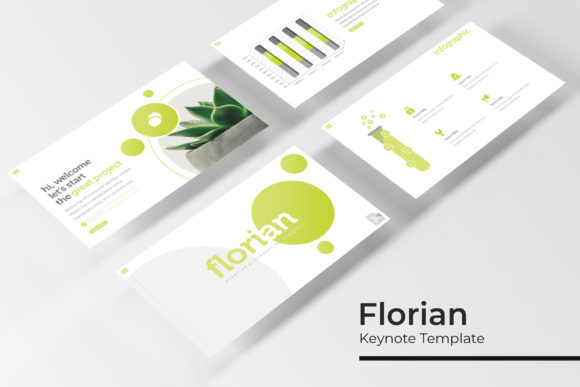
Florian Keynote Template: Streamline Your Next Presentation
You know the feeling. You're prepping for a big pitch, a workshop, or a quarterly review, and the thought of starting a presentation from scratch is paralyzing. You need something professional, visually engaging, and—let's be honest—something that won't take you 10 hours to customize. That's where a robust, pre-built template system like the Florian Keynote Template comes in. It’s not just a collection of slides; it's a comprehensive toolkit designed to give you a cohesive visual language right out of the box.
A Foundation for Visual Consistency
At its core, the Florian template is built on the principle of visual consistency. With 150+ total slides organized across 5 premade color palettes, you get 30 meticulously designed slides for each color variation. This isn't just about having options; it's about maintaining a unified brand identity throughout your entire deck. Whether you're presenting to investors, training a team, or pitching to clients, using a consistent color scheme, typography, and layout style reinforces your professionalism and makes your message more memorable. The included handcrafted infographics and section break slides ensure that even complex data or transitions feel intentional and polished.
Designed for Real-World Efficiency
Let's talk about what makes this template pack practical for busy professionals. The resizable and editable graphics with picture placeholders mean you can drag and drop your own images directly into the design without fussing with alignment or sizing. Every element is based on master slides, so global changes to fonts, colors, or layouts can be made in seconds, propagating across your entire presentation. This master slide architecture is a game-changer for anyone who needs to update content quickly or maintain multiple versions of a presentation. The pixel-perfect illustrations ensure that your visuals look sharp and professional on any screen, from a laptop to a large projector.
Think about the applications beyond a standard business pitch. This template system is ideal for creating portfolio showcases for designers, product launch decks for entrepreneurs, or educational workshops for coaches and consultants. The gallery and portfolio slides provide a clean, structured way to display work samples, case studies, or visual examples, making it a versatile asset for creative professionals and marketers alike.
What's Actually in the Box?
When you download this package, you're getting a complete suite of design assets. You'll find 5 PPTX files for standard aspect ratios and 5 PPTX widescreen files, covering the most common presentation formats. Each of the 5 premade color themes is a fully realized design direction, giving you immediate variety without the need to start from a blank canvas. A Readme First document is included to guide you through setup, and the font used is a free download, with the link provided, so you can maintain the design's integrity without hunting for or purchasing additional typefaces.
A quick but important note: the photographs and pictures shown in the preview are for illustration only and are not included in the download. This is standard practice, as it allows you to insert your own branded imagery and avoid licensing issues.
Integrating a Template into Your Brand Workflow
Adopting a template like Florian is about more than just saving time on one presentation. It's about building a reusable brand identity asset. For small businesses and solopreneurs, this can be particularly valuable. Instead of recreating your visual style every time you need to present, you have a professional foundation that can be adapted for various purposes: investor pitches, client onboarding, internal training, or conference talks. The consistency helps build brand recognition with your audience.
When working with such a comprehensive template, here are a few practical tips:
- Start with the Master Slides: Before diving into individual slides, customize the master slides with your brand's primary and secondary colors, your logo, and your preferred fonts. This sets the stage for everything else.
- Use the Infographics Thoughtfully: The handcrafted infographics are powerful, but they should serve your content. Choose the chart or diagram that best communicates your specific data point, rather than forcing data into a visually appealing but ill-suited graphic.
- Test on Your Target Display: Always preview your presentation on the actual device or projector you'll use. Check for readability of text and clarity of images at the viewing distance.
- Keep Your Audience in Mind: While the template provides structure, your content should still tell a compelling story. Use the slides as a visual aid, not a script.
Ultimately, the value of a tool like the Florian Keynote Template lies in its ability to remove friction from the design process, allowing you to focus on your message. It provides a polished, professional visual framework that can adapt to a wide range of creative and commercial projects, ensuring your presentations always look as good as your ideas sound.