Streamline Your Next Big Pitch with the RE-ARRANGE Keynote Template
Creating a presentation that captures attention requires more than just great ideas; it demands a visual framework that is both flexible and polished. If you have ever found yourself spending hours adjusting text boxes and swapping color palettes manually, the RE-ARRANGE Keynote Template offers a solution designed to save time while maintaining a high-end aesthetic. This tool is built specifically for professionals who need to deliver impactful visual communication without getting bogged down in the technicalities of slide design. It serves as a comprehensive design asset, bridging the gap between a raw concept and a pixel-perfect final product.
A Modular System for Modern Storytelling
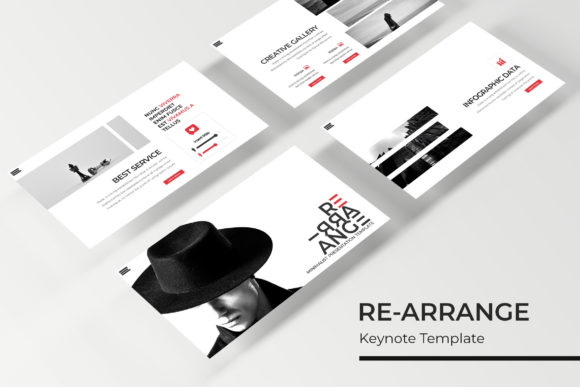
What sets this template apart is its structural integrity and modularity. Rather than offering a static set of slides, the system is built around a "drag and drop" philosophy that empowers users to customize layouts effortlessly. Whether you are a startup founder preparing for a pitch meeting or a marketing professional outlining a new campaign strategy, the ability to resize and edit graphics ensures that your specific content fits perfectly into the design.
The template boasts over 150 total slides, providing a massive library of options to construct your narrative. These are not repetitive variations of the same slide; they include distinct section breaks, gallery layouts, and portfolio slides that allow for dynamic storytelling. For instance, a photographer can utilize the gallery slides to showcase a series of high-resolution images, while a data analyst can leverage the handcrafted infographics to break down complex statistics. The visual consistency across these diverse slide types ensures that your presentation looks cohesive from the first slide to the last.
Visual Flexibility and Brand Alignment
One of the most significant challenges in professional design is maintaining brand identity across different mediums. The RE-ARRANGE Keynote Template addresses this by including five premade color variations, with 30 dedicated slides for each palette. This feature is invaluable for small business owners and designers who need to match their presentation to an existing brand guide or want to experiment with different color theories before finalizing a look.
Imagine you are pitching a rebrand to a client. You can use the "Cool Blue" variation to evoke trust and stability for one proposal, and then switch to the "Vibrant Coral" variation to demonstrate a more energetic, consumer-facing approach. This level of customization goes beyond simple color swapping; it involves pixel-perfect illustrations and master slide adjustments that ensure the typography and graphic elements harmonize with the chosen hue. The result is a professional presentation that reinforces brand recognition rather than diluting it with generic templates.
Furthermore, the inclusion of picture placeholders is a game-changer for those working with visual content. Instead of manually cropping and resizing images, users can simply drag and drop their photographs into the designated areas. This not only speeds up the workflow but also ensures that the composition remains balanced. For content creators and bloggers, this means less time fiddling with software and more time focusing on the message they want to convey to their audience.
Practical Applications Across Industries
The versatility of this Keynote template extends far beyond the boardroom. Its design style supports a wide range of creative applications, making it a valuable asset for various industries. For creative entrepreneurs, the slides can be repurposed for social media graphics. A well-designed slide deck often contains individual frames that are perfect for Instagram carousels or Pinterest pins. By utilizing the handcrafted infographics, you can extract data visualizations to create standalone marketing assets that drive engagement on social platforms.
For those in the e-commerce or packaging space, the clean lines and modern typography found in the template can serve as inspiration for digital product lookbooks. You can create a digital catalog that mimics the feel of an editorial layout, showcasing your merchandise in a sophisticated light. Similarly, educators and workshop facilitators can use the structure to create course materials that are easy to read and visually stimulating, helping to keep students or attendees engaged throughout the session.
The template also excels in internal communications. Project managers can use the section break slides to clearly delineate different phases of a project timeline, while HR departments can utilize the layout options to create engaging onboarding presentations. The adaptability of the slides means that the same file can be used to present quarterly earnings to stakeholders and later repurposed to train new employees on company values, simply by rearranging the content blocks.
Optimizing Your Workflow with Included Assets
Efficiency is at the heart of the RE-ARRANGE Keynote Template. The package includes five PPTX files, specifically formatted for widescreen displays, which is the standard for modern projectors and monitors. This ensures that your presentation will look crisp and professional, regardless of the venue. The "Readme First" file included in the package is a thoughtful addition, guiding users through the setup process and providing links to download the free fonts used in the design.
Typography plays a crucial role in readability and audience engagement. By using the recommended fonts, you ensure that the text hierarchy is preserved exactly as the designer intended. However, the master slides are built to accommodate font pairing adjustments if you wish to swap in your own brand fonts. This balance between structure and flexibility allows you to maintain a professional presentation while injecting your unique personality into the design.
It is important to note that while the template provides the structural framework, the photographs and pictures used in the preview are for illustration purposes only. This encourages users to source their own high-quality imagery, which is a best practice in design anyway. Using your own photographs or licensed stock images ensures that your presentation feels authentic and tailored to your specific message, rather than relying on generic stock photos that might appear in competitor decks.
Elevating Your Visual Communication Strategy
Ultimately, the goal of any presentation is to communicate an idea effectively. The RE-ARRANGE Keynote Template acts as a catalyst for this process by removing the technical barriers to good design. It empowers users to focus on content strategy—crafting the story, refining the argument, and planning the call to action—while the template handles the heavy lifting of layout and aesthetic appeal.
Whether you are designing a pitch deck for investors, a workshop for students, or a portfolio for potential clients, having a robust set of design assets at your disposal is essential. This template offers a practical, high-quality solution that adapts to your needs, ensuring that your visual communication is always on point. By leveraging these tools, you can transform a standard presentation into a memorable visual experience that resonates with your audience.