Master Your Next Presentation with the Ramona PowerPoint Template
You know that feeling when you open a blank PowerPoint slide and your mind goes completely empty? We’ve all been there, staring at the white void, wondering how to turn a stack of data or a creative brief into something people actually want to look at. If you are a small business owner trying to pitch investors, a marketer explaining quarterly results, or a creative freelancer showcasing a portfolio, the visual component of your presentation is just as important as the data itself. A messy deck can distract your audience, while a cohesive, professional design builds trust before you even say a word. That is exactly why having a robust design asset in your toolkit is a game-changer, specifically the Ramona Power Point Template. It’s not just a collection of slides; it is a comprehensive visual system designed to help you communicate with clarity and style.
More Than Just Slides: A Visual Communication System
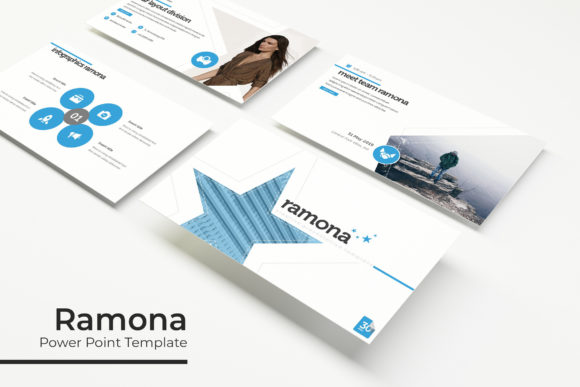
When we talk about modern typography and design assets, we usually think of logos or social media graphics. However, the Ramona Power Point Template brings that level of design sophistication to the boardroom or the Zoom call. What makes this template stand out in a sea of generic presentation tools? It comes down to the sheer volume and quality of the content included. We are looking at a massive library of over 150 total slides. That is a significant number of layouts to work with, ensuring you aren't recycling the same three designs throughout a 30-minute presentation.
The structure is built on five premade color themes. This is incredibly practical for brand consistency. Instead of manually trying to match hex codes to your brand guidelines, you simply select the color variation that aligns with your visual identity. Each of the five colors includes 30 distinct slides, covering everything from title cards to detailed data breakdowns. Whether your brand identity is bold and energetic or soft and minimalist, there is a variation here that works. It takes the guesswork out of color theory and lets you focus on your content.
Practicality Meets Pixel-Perfect Design
One of the biggest headaches with PowerPoint is often the graphics. We’ve all tried to resize an image or a shape only to have it pixelate or distort, ruining the professional look of the slide. The Ramona Power Point Template solves this with pixel-perfect illustrations and fully resizable, editable graphics. Because it is based on Master Slides, the underlying architecture is solid. You can move elements around without breaking the layout, and the "drag & drop" picture placeholder feature makes inserting your own photos a breeze.
Think about the time you spend fiddling with alignment tools. This template minimizes that friction. The handcrafted infographics are particularly useful for anyone dealing with complex information. Instead of trying to build a bar chart or a timeline from scratch, you have professionally designed frameworks ready to go. This is vital for readability. A well-designed infographic can explain a concept in seconds that might take paragraphs of text to describe. For bloggers and content creators, these slides can even be exported as images to create standalone social media graphics or blog headers, extending the value of the asset beyond the presentation itself.
Versatility Across Industries and Projects
The beauty of a high-quality PowerPoint template lies in its versatility. You might assume it is only for corporate meetings, but the Ramona Power Point Template is a powerful tool for a variety of creative applications.
For small business owners, this is your go-to for sales decks and investor pitches. A polished presentation signals that you take your business seriously. For designers and photographers, the included Gallery and Portfolio slides are essential. These layouts are designed to let your work shine without distracting borders or text overlaps. You can present your logo design projects or packaging design mockups in a cohesive narrative format.
Even if you are in editorial design or digital products, the template offers value. You can use the slides to map out the layout of a magazine spread or visualize the user flow of a new app. Marketers will find the section break slides particularly helpful for organizing a campaign strategy, clearly delineating between the "Problem," "Solution," and "Implementation" phases.
Streamlining Your Workflow and Branding
Time is money, especially for entrepreneurs and freelancers. The "Readme First" document included with the download is a smart touch, helping you get set up immediately. Furthermore, the template utilizes free fonts, and the download includes the links you need to install them. This ensures that when you open the file, it looks exactly like the preview—no missing font errors or awkward replacements.
Using a template like this helps improve visual consistency. When every slide shares the same design language—consistent margins, typography, and color palette—it creates a rhythm that makes it easier for your audience to follow along. This consistency boosts brand recognition. If you are presenting to a client, seeing your brand colors and style reflected perfectly in the deck reinforces your professionalism.
Here are a few tips to get the most out of the Ramona Power Point Template:
- Don't overcrowd: Just because you have 150+ slides doesn't mean you need to use them all. Select the layouts that best serve your specific story.
- Use the Portfolio slides for case studies: Even if you aren't a photographer, use the gallery layouts to show "before and after" results or happy customer testimonials.
- Leverage the infographics for data: If you have statistics to share, use the handcrafted charts. They are easier to read than Excel exports and look significantly more expensive.
- Test your color variations: Before settling on one of the five premade colors, try applying a few different ones to see which creates the best mood for your topic.
Final Thoughts on Elevating Your Presentation Game
In the end, a presentation is a storytelling medium. The Ramona Power Point Template provides the stage, the lighting, and the props, but you provide the voice. By removing the technical barriers of design, you free yourself up to focus on what matters: connecting with your audience. Whether you are selling a product, teaching a concept, or sharing a creative vision, having a professional, adaptable, and visually striking template ensures that your message is received exactly how you intended it. It is an investment in your professional image that pays dividends every time you click "Present."