Santosa Keynote Template: Crafting a Cohesive Visual Story
You've spent weeks refining your business plan, perfecting your pitch deck, or outlining a workshop curriculum. The content is solid, the data is compelling, and your narrative is clear. Yet, when you open a blank presentation software, that familiar dread sets in. How do you translate this brilliant strategy into slides that don't just inform, but captivate? How do you avoid the generic, cookie-cutter look that plagues so many corporate presentations? This is the gap where a tool like the Santosa Keynote Template steps in, not as a mere collection of slides, but as a foundational design system for your visual communication.
Beyond Slides: A Foundation for Visual Identity
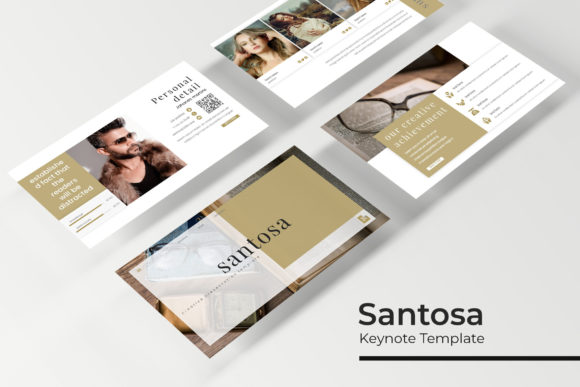
At its core, Santosa is a presentation toolkit, but its real value lies in its function as a brand-building asset. For a small business owner launching a new product, consistency is everything. Your investor deck, your team training materials, and your client-facing proposals should all whisper the same brand story. With 150+ total slides across five premade color themes, Santosa provides a structured visual language. Each of the five color variations offers 30 meticulously designed slides, allowing you to select a palette that aligns with your brand's energy—whether it's the trustworthy calm of blues and grays or the innovative spark of vibrant teals and corals. This isn't about choosing a template; it's about adopting a visual framework that ensures every presentation you create reinforces your brand identity from the first slide to the last.
The Anatomy of an Effective Presentation Kit
What separates a professional template from a basic one? It's in the thoughtful details that save time and elevate quality. Santosa includes handcrafted infographics, which are far more engaging than standard bar charts. Imagine explaining a complex market analysis not with a generic pie chart, but with a custom-designed flowchart or a layered diagram that visually guides your audience through the information. The inclusion of section break slides is another subtle yet powerful feature. These act as visual "chapters," helping your audience mentally organize the information and providing a momentary pause that can enhance retention.
For entrepreneurs and creators who work with visuals—think photographers, architects, or designers—the gallery and portfolio slides are indispensable. These layouts are designed to showcase work without distraction, using clean grids and ample white space to let your images command attention. The drag-and-drop picture placeholders mean you can update your portfolio in minutes, not hours, making it easy to keep your materials current for client meetings or networking events.
Practical Applications for the Modern Creator
The true test of any design asset is its versatility. How can a presentation template serve a blogger, a marketer, or a craft business owner? The answer lies in its adaptability. The pixel-perfect illustrations and resizable, editable graphics are not just for corporate slides. A content creator can repurpose the infographic layouts to design compelling social media carousels that explain a blog post's key points. A small e-commerce brand can use the clean slide layouts as a style guide for packaging mockups or as a basis for designing promotional posters and flyers for a local market.
Consider the entrepreneur developing a new course. The structured slide layouts are perfect for building the course curriculum outline, the sales page, and the webinar slides, all sharing a unified aesthetic. The master slides functionality is the engine behind this efficiency. By editing elements on the master slide, you ensure changes—like updating a logo or changing a font—propagate across all 30 slides in a color theme instantly. This eliminates the tedious, error-prone process of manually updating each slide, guaranteeing pixel-perfect consistency across your entire digital product suite or marketing campaign.
Making It Your Own: Integration and Workflow
A template should feel like a starting point, not a cage. Santosa's design acknowledges this by being fully editable within Keynote. The font used in the previews is a free download, linked in the included readme file, which removes a common barrier for those who want to replicate the exact look. However, the system is robust enough to work with your existing brand fonts. Swapping in your preferred typeface—be it a modern sans serif for a tech startup or a classic serif for a law firm's presentation—is straightforward, allowing the layout and structure to support your unique voice.
It's important to remember that the photographs and pictures in the preview are for illustration only and are not included. This is a common and necessary practice, as it encourages users to inject their own authentic imagery. Your team headshots, your product photography, your behind-the-scenes shots—these are the elements that will truly make the presentation yours and connect with your specific audience. The template provides the professional scaffolding; you provide the soul.
Investing in Efficiency and Professionalism
For the busy professional, time is the most valuable currency. The hours spent wrestling with alignment, color coordination, and infographic design from scratch are hours taken away from strategy, content creation, or client work. A comprehensive toolkit like Santosa Keynote Template is an investment in workflow efficiency. It compresses the design phase, allowing you to move from concept to a polished, presentation-ready asset rapidly. This speed is crucial for responding to opportunities, whether it's a last-minute pitch to a potential partner or a quick update to a training module.
Ultimately, the goal of any presentation is clear communication and audience engagement. A cluttered, poorly designed deck can undermine even the most compelling content. By providing a clean, modern, and structured visual system, Santosa helps you present your ideas with the clarity and professionalism they deserve. It transforms the daunting task of presentation design into a manageable, even enjoyable, part of your creative or business process, letting you focus on what you do best: sharing your vision with the world.