Jantra Keynote Template: A Visual Toolkit for Modern Presentations
Imagine you're preparing for a crucial pitch, a quarterly review, or a workshop. You open your presentation software and face a blank, intimidating canvas. The clock is ticking, and you need something that looks polished, professional, and distinctly you. This is where a thoughtfully designed template like the Jantra Keynote Template moves from being a nice-to-have to an essential creative partner. It’s not just about having pretty slides; it’s about having a structured, visually coherent system that lets your ideas shine without the design headache.
Beyond Slides: A Cohesive Design System at Your Fingertips
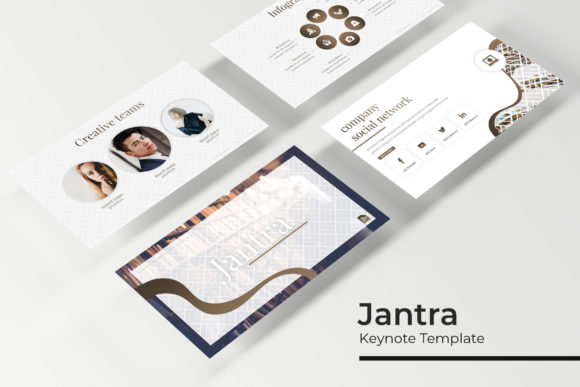
What sets the Jantra Keynote Template apart is its foundation as a complete visual toolkit. With over 150 total slides built on five premade color schemes, you’re not getting a single look, but a versatile family of presentations. Each of the five color variations includes 30 meticulously crafted slides, ensuring you have a slide for every conceivable need—from a compelling title card to a detailed data breakdown. This structure is a game-changer for maintaining visual consistency. Whether you're building a brand identity from scratch or applying an existing one, using the same color palette and design language across all your materials reinforces recognition and professionalism. The handcrafted infographics and section break slides are particularly valuable, transforming complex information into digestible, engaging visuals that hold an audience's attention far better than bullet points ever could.
Practical Applications: From Boardroom to Social Feed
The true test of any design asset is its real-world utility. The Jantra template’s pixel-perfect illustrations and resizable, editable graphics make it adaptable across a surprising range of projects. For entrepreneurs and small business owners, this means a single investment can fuel multiple aspects of their brand identity.
- Client Pitches & Investor Decks: Use the gallery and portfolio slides to showcase past work with stunning clarity. The professional layout instantly builds credibility.
- Internal Communications: Create quarterly reports, team training materials, or project roadmaps that are easy to follow and visually engaging, boosting comprehension and retention.
- Marketing & Social Media: Export individual slides or elements as high-quality graphics for LinkedIn posts, Instagram stories, or blog headers. The consistent style ensures your social media graphics align perfectly with your broader brand identity.
- Digital Products & Course Content: For creators and educators, the template can structure online course modules, webinar slides, or downloadable guides, giving your digital products a premium, polished feel.
- Event Planning & Invitations: The clean, modern typography and elegant layouts are ideal for designing event agendas, speaker introductions, or even digital invitations that set the right tone.
Streamlining Your Workflow: The Power of a Master Slides Foundation
One of the most significant, yet often overlooked, features of the Jantra Keynote Template is its architecture based on Master Slides. This isn't just a technical detail; it’s a profound efficiency boost. Think of the Master Slides as the template's DNA. When you edit a font, color, or logo placement on a Master Slide, that change automatically propagates across every slide using that layout. Need to switch your primary brand color halfway through a 100-slide deck? Do it once on the Master Slide, and it updates everywhere. This drag & drop functionality for picture placeholders also simplifies adding your own content. You spend less time wrestling with formatting and more time refining your message. For a busy marketer or a solopreneur juggling multiple tasks, this streamlined workflow is invaluable, ensuring your professional presentation is always on point without consuming your entire day.
Making It Your Own: Customization and Considerations
While the template provides a robust starting point, its real value is unlocked through thoughtful customization. Here’s how to approach it effectively:
- Align with Your Brand Voice: The five premade colors are a starting point. Use the editable color palettes to plug in your exact brand hex codes. This transforms the template from a generic tool into a true extension of your brand identity.
- Typography Choices: The included free font download link is a thoughtful touch. Review the recommended font styles (likely a mix of serif, sans serif, and possibly a display font for impact). Test font pairings to find what best conveys your message—perhaps a clean sans-serif for body text paired with a bold serif for headings. Always prioritize readability, especially for data-heavy slides.
- Content Hierarchy: Use the provided slide layouts to enforce a clear visual hierarchy. The section break slides are perfect for signaling a shift in topic, while the infographic slides help your audience grasp key metrics at a glance. This structure directly improves audience engagement by guiding their focus.
- Licensing Clarity: The "Readme First" file is crucial. Ensure you understand the commercial licensing terms, especially if you plan to use the final presentation in client work, sold digital products, or public-facing materials. This is a standard but essential step for any design asset.
Ultimately, the Jantra Keynote Template is more than a collection of slides. It’s a framework for clear communication and modern typography. It acknowledges that in our visually saturated world, how you present information is almost as important as the information itself. By providing a structured, beautiful, and highly customizable system, it empowers designers, business owners, and creators to produce work that looks consistently professional, fosters stronger brand recognition, and, most importantly, effectively connects with their intended audience. The included files—five PPTX files for widescreen presentations, the color variations, and the font resources—give you everything you need to move from concept to a polished, ready-to-share presentation that truly stands out.