Hadverb Keynote Template: A Visual Toolkit for Polished Presentations
You've got the data, the story, the big idea. But when it's time to present, you open a blank slide deck and the momentum stalls. Finding the right layout, color scheme, and visual flow can consume hours you don't have. The Hadverb Keynote Template exists to solve that exact problem, offering a structured yet flexible foundation for anyone who needs to communicate ideas visually with confidence and speed.
More Than Slides: A Cohesive Design System
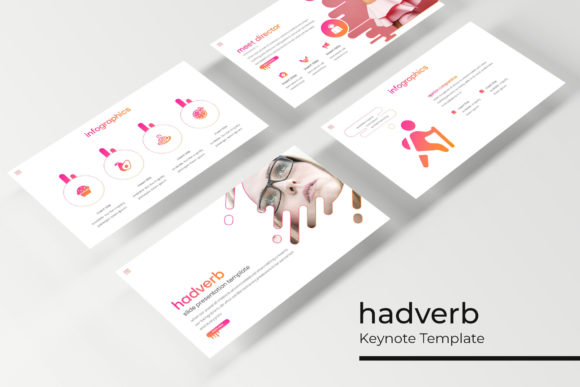
Think of the Hadverb Keynote Template not as a collection of individual slides, but as a unified design system for your presentations. With over 150 total slides organized into five premade color themes, each containing 30 meticulously crafted slides, it provides a comprehensive vocabulary of visual communication. The five color variations allow you to instantly align your presentation with a client's brand guidelines, your own company's palette, or the specific mood of your topic—be it energetic and bold or calm and professional.
The value lies in the consistency. Every slide within a color theme shares the same typographic hierarchy, spacing, and graphic language. This means your deck will look intentionally designed from the first title slide to the last "Thank You" page, reinforcing your professionalism and helping your audience focus on the content rather than being distracted by inconsistent visuals.
Infographics That Tell a Story, Not Just Display Data
One of the standout features is the handcrafted infographic section. Instead of generic charts and graphs, these are thoughtfully designed visual metaphors. You might find a process flow that uses connected icons to illustrate steps, a comparison slide that uses balanced columns and subtle color coding, or a timeline that guides the eye naturally from past to future.
These aren't just decorative; they're functional tools for comprehension. For a small business owner explaining a new service workflow, or a marketer breaking down campaign results, these infographics translate complex information into an accessible narrative. The section break slides are particularly useful for pausing between major topics, giving your audience a visual and mental reset before diving into the next segment.
Built for Real-World Use: Drag, Drop, and Customize
The practicality of the Hadverb template is where it truly shines for busy professionals. Every graphic element is built on master slides, ensuring changes are seamless and global. Picture placeholders are resizable and editable, meaning you can drag and drop your own images directly into pre-defined frames without struggling to fit or crop them perfectly. This pixel-perfect approach saves immense time and prevents the awkward, misaligned images that can plague a rushed presentation.
Whether you're preparing a portfolio review for a client, an internal company update, or a keynote for a conference, the structure is there to support you. The gallery and portfolio slides offer clean, grid-based layouts ideal for showcasing work, while the master slide architecture means your customizations—like changing a font or adjusting a color accent—propagate throughout the entire deck, maintaining that crucial visual consistency.
Choosing the Right Template for Your Project Goals
With five distinct color themes included, the first step is to select the one that best matches your objective. Ask yourself: What is the emotional tone of my message? A deep blue and charcoal theme might convey stability and authority for a financial report, while a vibrant coral and teal palette could energize a startup pitch or creative proposal. Don't just pick your favorite color; consider the psychological impact on your specific audience.
Next, explore the slide types. The template includes everything from data-driven layouts to minimalist text-focused slides. A consultant might rely heavily on the infographic and chart slides, while a photographer or designer will find immense value in the portfolio and gallery sections. Understanding what's available allows you to plan your content around the strengths of the template, rather than forcing content into ill-fitting slides.
Enhancing Brand Recognition and Professional Polish
For entrepreneurs and small business owners, consistent branding across all touchpoints is non-negotiable. Using the Hadverb Keynote Template as a base for all company presentations—from sales decks to investor pitches to team training—immediately elevates the perceived quality of your brand. It signals that you value detail and professionalism.
The included files are PPTX widescreen format, ready for modern displays. The font used is a free download, with a link provided in the readme file, so there are no hidden licensing hurdles. This is a commercial-friendly asset, but always double-check the license for any included graphics or photographs if you intend to use the template beyond the preview examples. The photographs shown in the preview are for illustration only and are not included, which is standard practice, reminding you to source your own high-quality imagery to make the presentation truly yours.
Final Thoughts on Integrating This Asset into Your Workflow
The Hadverb Keynote Template is best viewed as a launchpad. It eliminates the blank-page paralysis and the tedious hours spent on foundational design, allowing you to focus your creative energy on the story you need to tell. It's a tool for the designer who needs to mock up concepts quickly, the marketer who must produce a cohesive brand deck overnight, or the teacher who wants to make lessons more visually engaging.
By providing a robust, adaptable framework of slides, it supports better communication habits: clearer data visualization, more strategic use of imagery, and a more confident, polished delivery. In a world where attention is scarce, starting with a strong visual foundation isn't a luxury—it's a practical advantage that helps your ideas get the consideration they deserve.