GrozA Keynote Template: A Toolkit for Polished Presentations
Every entrepreneur, designer, or creative professional knows the frustration of starting a presentation from a blank slide. You have the data, the strategy, and the story, but visualizing it effectively requires a level of design expertise that isn't everyone's forte. This is where a robust design asset becomes invaluable. The GrozA Keynote Template is a comprehensive solution designed to bridge the gap between a great idea and a visually compelling presentation. It’s more than just a set of slides; it's a structured framework built for clarity, professionalism, and visual impact.
Understanding the Core of GrozA
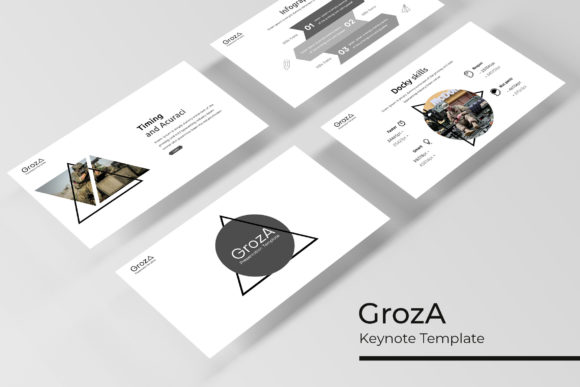
At its foundation, GrozA is a collection of 150+ total slides, meticulously organized to serve a wide array of presentation needs. The true strength, however, lies in its structure and versatility. The template comes in 5 premade color schemes, each containing 30 unique slides. This means you're not just getting one look; you're getting five distinct visual identities to start with. Whether your brand calls for a cool, corporate blue, a warm and energetic orange, or a sophisticated monochrome palette, there’s a starting point that aligns with your project's tone. This approach to modern typography and color theory helps in establishing immediate visual consistency, a cornerstone of strong brand identity.
The slides themselves are built on master slides, a critical feature for anyone serious about efficient design. This allows for global changes—like updating a font or adjusting a color accent—across the entire presentation with a few clicks. For a small business owner managing multiple projects, or a marketer preparing client decks, this saves countless hours and eliminates the risk of inconsistent formatting. The graphics are pixel-perfect illustrations, ensuring your presentation looks sharp and professional on any screen, from a laptop to a large projector.
From Slides to Stories: Practical Applications
Think of a presentation not as a mere report, but as a narrative tool. The GrozA template is designed to facilitate storytelling. Its handcrafted infographics transform complex data into digestible, engaging visuals. Instead of a dense table of numbers, you can present a growth chart, a process flow, or a comparison graphic that tells the story at a glance. This is invaluable for pitching to investors, explaining a marketing funnel to a team, or showcasing results to a client.
The inclusion of gallery and portfolio slides opens up direct applications for creatives. A photographer can showcase their best work in a clean, elegant layout. A graphic designer can present a brand identity project, moving seamlessly from logo concepts to packaging mockups. An architect or interior designer can use these slides to walk a client through a project vision. The resizable and editable graphic picture placeholders with drag-and-drop functionality make this process intuitive. You don't need to be a PowerPoint or Keynote expert to place your images precisely and have them look fantastic.
Consider the section break slides. These are often overlooked, yet they are powerful tools for pacing and emphasis. A well-designed section break can signal a shift in topic, give your audience a mental pause, and reinforce your visual branding. It’s a small detail that contributes significantly to a professional presentation and overall audience engagement.
Building a Cohesive Brand Ecosystem
A strong brand is consistent across all touchpoints. The GrozA template is a single asset that can help enforce that consistency in your spoken communications. The font pairings suggested within the template (with free download links provided) are chosen for readability and aesthetic harmony. When you use the same typeface in your presentation that you use in your website headers or social media graphics, you create a seamless experience for your audience. This repetition builds brand recognition and trust.
This toolkit is ideal for creating a suite of related materials. Use the master slide structure to develop a core company overview deck. Then, duplicate and adapt it for specific purposes: a sales pitch, an investor meeting, a team onboarding guide, or a workshop outline. The visual language remains unified, saving you from the "franken-deck" problem where slides from different sources clash visually. For entrepreneurs and content creators, this means you can quickly produce professional-looking materials for marketing assets, digital products, or editorial layouts that all feel like they came from the same cohesive brand.
Maximizing Your Investment: Tips for Use
Getting the most out of a template like this requires a bit of strategy. First, don't feel constrained by the premade color schemes. While they are expertly designed, the master slide setup makes it easy to adapt them to your exact brand colors. Start by inputting your primary and secondary brand colors into the master slides to instantly personalize the entire deck.
Second, leverage the infographic library strategically. Don't just use a pie chart because it's there. Ask yourself: what is the single most important piece of data on this slide? Then choose the infographic type—be it a timeline, a process diagram, or a comparison chart—that communicates that insight most clearly. The goal is to aid understanding, not just to decorate.
Third, pay attention to the font pairing examples provided. Good typography is about hierarchy and contrast. Use a bold, clean sans serif font for headings to grab attention, and pair it with a highly legible serif or sans serif for body text. Avoid using more than two or three font styles in a single presentation to maintain a clean, uncluttered look. Test your slides in presentation mode to ensure text is readable from the back of a room.
Finally, remember the included "Readme First" file. It contains essential information about the commercial font licenses and specific instructions for best use. Understanding these details ensures you are using the assets correctly for your projects, whether personal or commercial.
The GrozA Keynote Template is ultimately about removing the technical barriers to effective visual communication. It provides a polished, professional foundation so you can focus on what truly matters: the content of your message and the connection with your audience. By offering a vast library of customizable, well-structured slides, it empowers designers, entrepreneurs, and creators to build presentations that are not only informative but also visually persuasive and unmistakably professional.