Fader PowerPoint Template: A Modern Toolkit for Polished Presentations
Staring at a blank slide deck, trying to conjure a presentation that looks both professional and visually cohesive, is a familiar frustration for many. You need something that feels contemporary, flexible enough for different content, and won't take days to customize. This is where a well-structured template system like the Fader PowerPoint Template steps in, offering a foundation that balances aesthetic appeal with practical functionality for real-world projects.
Visual Appeal Rooted in Flexibility
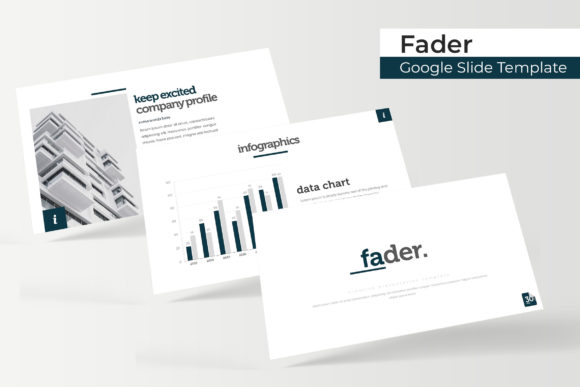
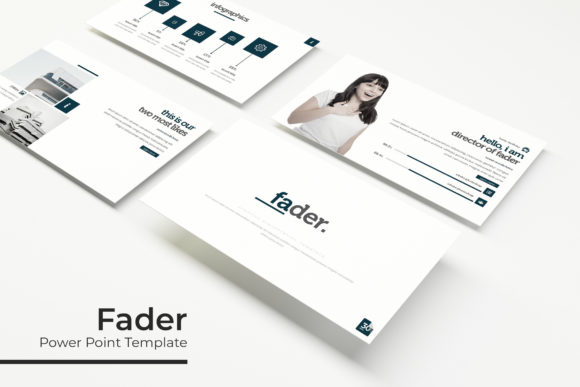
What immediately stands out about the Fader template is its clean, modern design language. It avoids overly trendy elements that might date quickly, opting instead for a balanced aesthetic that feels both current and timeless. The 150+ total slides are built on a foundation of strong typography and ample white space, ensuring your content remains the hero. The inclusion of five premade color palettes is a significant time-saver. Each palette provides 30 dedicated slides, allowing you to instantly shift the mood of your presentation to align with a specific brand, topic, or audience. Whether you need a vibrant, energetic look or a subdued, corporate feel, switching between the color variations—each with its own consistent slide master—ensures visual harmony without manual recoloring.
The true power lies in the detail. Handcrafted infographics replace generic clipart, offering unique ways to visualize data, processes, and timelines. Section break slides provide clear visual punctuation, helping your audience follow the narrative flow. Dedicated gallery and portfolio slides are thoughtfully designed with picture placeholders, making it simple to showcase work, products, or team members. The promise of "pixel-perfect illustrations" means the vector shapes and icons are sharp and scalable, maintaining quality no matter the display size.
Practical Applications for Diverse Needs
This template's structure makes it a versatile asset across numerous professional and creative fields. For a small business owner, it can become the backbone of all client-facing communication—transforming a sales pitch, a project proposal, or an internal training session into a branded experience. The consistent use of color and layout reinforces brand recognition, making every slide feel like an extension of your logo and website.
Marketers and content creators will find the pre-built layouts invaluable for crafting social media graphics, webinar slides, or digital product launches. The drag-and-drop functionality, based on master slides, allows for rapid assembly of content. Imagine creating a series of Instagram Stories or LinkedIn carousel posts that visually mirror the style of your main presentation, ensuring a unified brand presence across platforms. The included section break slides are perfect for introducing new topics in a blog post series or chapter dividers in an editorial layout.
For designers and agencies, the Fader template serves as a robust starting point for client work. The resizable and editable graphics mean you can adapt every element—icons, charts, maps—to a client's specific brand guidelines. The portfolio slides offer a professional gallery format to present case studies, which can be repurposed into PDF leave-behinds or embedded on a website. Even for personal projects, like planning a wedding, organizing a community event, or designing a workshop for fellow hobbyists, the template provides a polished framework that elevates the final output.
Streamlining Your Workflow and Enhancing Communication
One of the most significant advantages of a comprehensive template system is the efficiency it introduces. Instead of building each slide from scratch, you're curating from a library of professionally designed components. This drastically reduces production time, allowing you to focus on refining your message and rehearsing your delivery. The "drag & drop" based on master slides is key here; it means structural elements like headers, footers, and background designs are locked in place, ensuring consistency as you add your own content to the picture placeholders.
Visual consistency is critical for professional presentation. A haphazard mix of fonts, colors, and layouts can distract from your message and undermine credibility. The Fader template's unified design system ensures that every slide, from a text-heavy agenda to a data-rich chart, feels like part of the same story. This coherence builds trust with your audience and makes your content more digestible.
Furthermore, the right visual support enhances readability and engagement. The template's use of clear hierarchies, contrasting colors (within its palettes), and dedicated infographic slides helps break down complex information. Instead of a wall of text, you can present ideas through visual metaphors, timelines, and comparison charts, catering to different learning styles and keeping your audience engaged throughout.
Getting Started and Making It Your Own
The package is designed for immediate use. You receive five PPTX files for standard aspect ratio and five PPTX widescreen files, covering the most common presentation formats. The "Readme First" file is an essential starting point, guiding you through the setup and explaining the structure. A crucial note is that the template utilizes specific free fonts, with download links provided. Installing these fonts before you begin is non-negotiable; otherwise, the carefully chosen typography will revert to defaults, breaking the visual design.
While the preview photographs are for illustration only and not included, the template's graphic placeholders are where you insert your own images. This is where your project's unique identity comes to life. To get the most out of the design:
- Match Color to Context: Don't just pick your favorite of the five colors. Consider the context. A financial report might call for the blue or gray palette, while a creative workshop could use the more vibrant option.
- Leverage the Infographics: Don't let the handcrafted infographics go to waste. Use them to replace simple bullet points. A process diagram can explain a workflow far more effectively than a list. A timeline slide can make a project history or future roadmap instantly clear.
- Customize with Care: While everything is editable, exercise restraint. The strength of the template is its pre-designed harmony. Change the colors to match your brand, swap placeholder text for your own, and insert your images, but be mindful of altering the fundamental layout grid and typography scale unless you have a clear design goal.
Remember, the goal is to use the template as a springboard, not a straitjacket. It handles the heavy lifting of design and consistency, freeing you to concentrate on crafting a compelling narrative and delivering your message with confidence. In a world where visual communication is paramount, having a reliable, flexible, and visually appealing toolkit like this can make the difference between a presentation that gets by and one that truly resonates.