Mastering Measurement: A Visual Strategy for Data-Driven Presentations
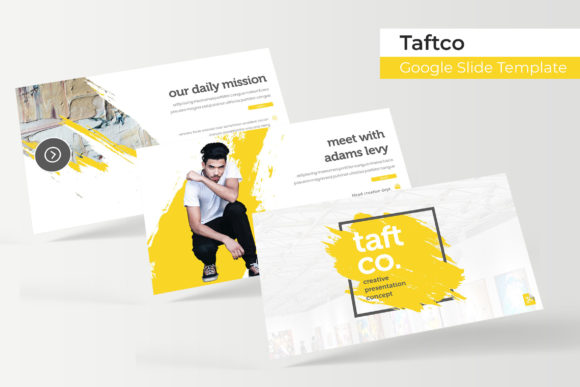
Staring at a blank presentation slide when you have a stack of complex data to share is a specific kind of dread familiar to almost every professional. Whether you are a small business owner pitching a growth strategy, a marketer outlining campaign metrics, or a designer presenting a portfolio, the challenge is rarely the data itself—it is the delivery. You need your audience to grasp the numbers, but spreadsheets and walls of text simply do not command attention in a meeting room or on a webinar. This is where the concept of "measurement" transforms from a dry statistic into a visual story. The right visual framework does not just hold your data; it interprets it, making the complex accessible and the mundane compelling. For those tasked with presenting quarterly reviews, project timelines, or product specifications, the Taftco Google Slide Template offers a robust solution that bridges the gap between raw data and polished, persuasive storytelling.
The Architecture of Clarity: Why Structure Matters
The foundation of any successful presentation is consistency. When a viewer sees a slide, their brain immediately tries to organize the information. If the layout shifts wildly from slide to slide—different fonts, clashing colors, inconsistent margins—the viewer spends more mental energy trying to decipher the visual language than understanding your content. This is why a template built on a Master Slide architecture is non-negotiable for professional work. The Taftco template utilizes this pixel-perfect illustration approach to ensure that every element, from the header to the footer, aligns perfectly. This structural integrity is crucial when dealing with measurement and analytics. If you are showing a bar graph on slide 4 and a pie chart on slide 5, the visual language needs to feel like they belong to the same family. By using a system based on Master Slides, you ensure that your typography, spacing, and color usage remain uniform, allowing your audience to focus entirely on the metrics you are presenting.
Visualizing the Numbers: Infographics and Data Representation
Numbers alone rarely inspire action; context does. One of the standout features of this collection is the inclusion of handcrafted infographics designed specifically for PowerPoint and Google Slides. When you are dealing with "measurement"—be it market share, customer retention, or financial growth—you need visual metaphors to help the audience digest the information quickly. A dense paragraph explaining a 15% increase in efficiency is often ignored, but a clean, editable graphic showing that growth trajectory is instantly understood.
The template provides over 150 total slides, which means you are not limited to one style of data visualization. You can choose from timeline graphics for project milestones, comparison charts for competitive analysis, or flowcharts for operational processes. Because these graphics are resizable and editable, they offer immense flexibility. You might be a startup founder who needs to show a complex user journey, or a freelancer mapping out a service package. The ability to drag and drop your specific data points into these pre-built frameworks saves hours of design time while maintaining a high-end aesthetic that builds credibility.
Color Psychology and Brand Cohesion
Color is often the first thing an audience registers, even before they read a single word. In the context of branding and presentation design, color sets the emotional tone. A financial report might call for deep blues and grays to convey stability and trust, while a creative pitch might require vibrant oranges or teals to signal innovation. Recognizing that no single palette fits every brand or every project, the Taftco template includes five premade color variations. This is a massive advantage for agencies or businesses that manage multiple sub-brands. You can switch the entire mood of the presentation with a single click, ensuring that the visual identity aligns perfectly with the specific topic of "measurement" you are discussing.
Furthermore, the inclusion of section break slides is a subtle but powerful tool for pacing. When presenting a lot of data, cognitive overload is a real risk. Section breaks act as visual palate cleansers, signaling to the audience that one topic is concluding and another is beginning. This pause allows for mental processing, ensuring that the insights you just shared have time to sink in before you introduce the next set of metrics.
Practicality for the Modern Creator: Assets and Usability
For the entrepreneur or content creator juggling multiple roles, the technical barrier to entry for design software can be frustrating. A template should simplify the workflow, not complicate it. The design of this collection focuses on user experience, featuring a drag-and-drop interface that is intuitive even for those with minimal design experience. The picture placeholders are designed to be resizable and editable, meaning you can easily swap out stock imagery for your own product photos or team headshots without breaking the layout.
This is particularly useful for portfolio slides. If you are a photographer, architect, or graphic designer, your presentation is essentially a proof of your capability. The gallery and portfolio slides included in this pack allow you to showcase your work in a grid layout that maximizes visual impact. Instead of fiddling with alignment and spacing for every image, you simply drop your work into the designated area. This efficiency allows you to focus on curating the best examples of your work rather than wrestling with formatting tools. It transforms the presentation file from a static document into a dynamic asset for your business development efforts.
Adapting to Any Screen: Widescreen and Beyond
The environment in which we present has changed drastically. We are no longer just projecting onto a square screen in a conference room. Today, presentations are viewed on widescreen monitors during Zoom calls, on tablets during client meetings, and on large 16:9 projectors in auditoriums. The Taftco template comes prepared for this reality with widescreen PPTX files. This aspect ratio provides a cinematic feel and gives you more horizontal real estate to work with. This extra space is invaluable when designing comparison slides—placing a "before" and "after" side-by-side, or showing a timeline that flows naturally from left to right without feeling cramped.
Moreover, the inclusion of 30 distinct slides for each of the five templates ensures that you have enough variety to cover a comprehensive business presentation without repeating layouts. This depth is essential for maintaining audience engagement. Seeing the same layout repeatedly can make a presentation feel monotonous, but having access to a library of unique designs allows you to match the visual style to the specific content of each slide. Whether you are presenting a dense financial breakdown or a simple mission statement, there is a specific slide architecture waiting to support that content.
Technical Considerations: Fonts and Compatibility
Typography is the voice of your visual design. A mismatch in fonts can make a professional presentation look amateurish instantly. One of the often-overlooked benefits of a well-crafted template is the curation of typography. The Taftco package includes a Readme file with links to the free fonts used in the design. This is a critical detail. It ensures that when you open the file, you can immediately download and install the typefaces intended for the design, preserving the original aesthetic. It removes the guesswork of trying to find a font that matches the preview images.
For those concerned about licensing, the use of free fonts for commercial projects is a significant cost-saver. It allows small business owners and freelancers to use high-quality typography without the added expense of purchasing premium font licenses for every project. This attention to detail—providing the exact resources needed to replicate the design—demonstrates a user-centric approach that prioritizes the creator's time and budget.
Conclusion: A Tool for Effective Communication
Ultimately, the goal of any presentation is communication. Whether you are measuring success, pitching a new idea, or showcasing a portfolio, the tools you use should amplify your message, not distract from it. The Taftco Google Slide Template and Measurement collection offers a comprehensive ecosystem for visual storytelling. By combining pixel-perfect illustrations, a flexible color system, and a user-friendly interface, it empowers creators to produce presentations that are not only visually striking but also structurally sound. It is a practical investment for anyone looking to elevate their professional communication and ensure that their data is not just seen, but understood and remembered.