Mastering Visual Consistency with the Plaque Power Point Template
Imagine this: you're preparing a crucial investor pitch, a quarterly business review, or a workshop for your community. You have the data, the story, and the passion, but staring at a blank PowerPoint slide feels daunting. The fear of creating something that looks disjointed, amateurish, or just plain boring is real. What if you could bypass that friction entirely and start with a foundation that’s already built for clarity, impact, and professional polish? That’s the core promise of a thoughtfully designed presentation template system, moving you from concept to compelling delivery with confidence.
Beyond a Single Slide Deck: A Complete Visual System
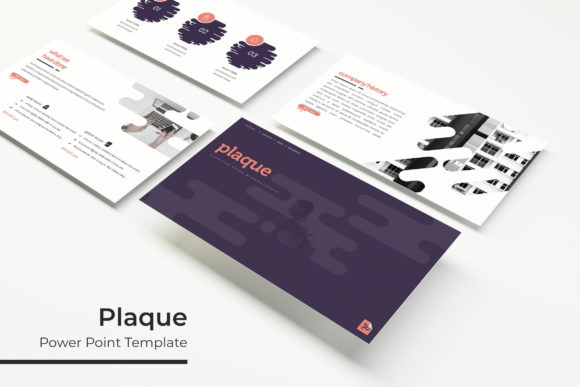
The Plaque PowerPoint Template isn't just another set of slides. It's a comprehensive visual toolkit designed to solve a common problem for busy professionals: maintaining a cohesive and high-quality visual identity across all your communications. With over 150 total slides distributed across five premade color themes—30 meticulously crafted slides for each palette—you’re equipped for a wide range of scenarios. This structure is its greatest strength. You’re not just buying a template; you’re investing in a versatile design system that adapts to your brand’s mood or the specific tone of your presentation, whether it’s corporate, creative, educational, or technical.
Practical Applications for Your Business and Projects
Let’s break down how this translates into real-world value. For small business owners and entrepreneurs, the template system is a game-changer for internal and external communications. Use the clean, modern slides to create a unified brand experience in everything from investor decks and sales proposals to team training materials. The consistent use of color, typography, and layout across all 150+ slides reinforces your brand identity, making your business look established and trustworthy. Content creators and marketers will find it invaluable for developing social media carousels, webinar presentations, or detailed campaign reports that need to hold an audience's attention. The handcrafted infographics transform complex data into engaging stories, perfect for blog post summaries, YouTube video scripts, or email newsletter content.
For designers and creative professionals, the template serves as an excellent starting point or a robust asset library. The pixel-perfect illustrations and resizable graphics are built on master slides, meaning you can edit them without breaking the design. This is ideal for creating consistent client presentations, portfolio showcases, or workshop materials. The section break slides and gallery/portfolio layouts provide a natural structure for showcasing creative work, making it easier to guide viewers through your projects. Even hobbyists and crafters can leverage this for creating polished tutorials, event invitations, or community announcements that look professional and are easy to customize.
Design Features That Drive Engagement and Clarity
What makes a presentation effective isn’t just information—it’s how that information is presented. The Plaque template focuses on design principles that enhance understanding and retention. The use of ample white space, clear typographic hierarchy, and balanced layouts ensures your message isn’t lost in visual clutter. Each of the five color themes is carefully curated to be both aesthetically pleasing and functional, providing enough contrast for readability while setting a distinct mood. This attention to visual consistency means your audience can focus on your content rather than being distracted by jarring design choices or inconsistent formatting.
Functionality is baked into every slide. The drag-and-drop picture placeholders are a practical lifesaver, allowing you to quickly insert your own images without wrestling with alignment or sizing. The fact that all graphics are resizable and editable means you can adapt any element to fit your specific content needs, a crucial feature for anyone who needs to customize assets for different projects. The inclusion of section break slides is a thoughtful touch; they act as visual chapter markers, helping to organize your narrative and give your audience a mental breather, which is especially important in longer presentations.
Maximizing Your Template: Tips for Effective Use
To get the most out of a resource like this, think of it as a flexible framework rather than a rigid script. Start by selecting the color theme that best aligns with your brand or the emotional tone of your presentation. A bold, high-contrast theme might be perfect for a dynamic sales pitch, while a softer, more muted palette could be ideal for a wellness or educational topic. Don’t feel obligated to use all 30 slides from a single theme. Mix and match elements from different color variations if it serves your story, but be mindful of maintaining overall coherence.
Pay special attention to the master slides. Understanding how they work will save you hours of editing time. Changes made to a master slide will cascade throughout your entire presentation, ensuring consistency in fonts, colors, and logos. This is where you can truly imprint your brand identity onto the template. When it comes to the included infographics and icons, consider them as visual vocabulary. Use the process diagrams to explain workflows, the comparison charts to highlight advantages, and the timeline slides to showcase history or future plans. This visual approach makes your information more digestible and memorable.
What’s in the Box and How to Get Started
When you download the Plaque PowerPoint Template package, you receive a complete, ready-to-use toolkit. The package includes five PPTX files, each corresponding to one of the premade color themes, formatted for widescreen displays. Alongside these, you’ll find a “Readme First” document and information on the font used in the design, including a free download link. This is a critical detail for ensuring your final presentation looks exactly as intended, as using the specified typeface maintains the designed typographic rhythm and style. It’s important to note that the photographic images seen in preview screenshots are for illustration purposes only and are not included, allowing you the freedom to insert your own high-quality visuals that are relevant to your content.
Getting started is straightforward. Open the PPTX file for your chosen color theme in PowerPoint. The slides are organized logically, starting with title slides, followed by various content layouts, infographics, and portfolio sections. Use the slide sorter view to get a quick overview of all available options and plan your presentation flow. Then, simply replace the placeholder text and images with your own content. The drag-and-drop functionality for images is intuitive, and the editable graphics mean you can change colors or shapes if needed, though the defaults are designed to work harmoniously. For best results, maintain the intended font pairing and color scheme as much as possible to preserve the template’s designed integrity and visual appeal.
Ultimately, a tool like the Plaque PowerPoint Template is about removing barriers. It eliminates the blank-page anxiety, saves significant design time, and provides a professional foundation that you might not have the resources to create from scratch. It empowers you to communicate your ideas with greater clarity, confidence, and visual impact, whether you’re aiming to secure funding, educate an audience, or simply share your passion project in the most compelling way possible.