Precision Power Point Template: Streamlining Your Visual Strategy
Staring at a blank slide deck, knowing you have only a few hours to prepare a pitch that could make or break a quarterly goal, is a specific kind of anxiety that professionals know all too well. It’s not just about having good ideas; it’s about presenting those ideas in a way that commands attention and communicates value instantly. For entrepreneurs, marketers, and creatives, the gap between a brilliant concept and a mediocre presentation often comes down to the tools used to build it. A disjointed color palette, inconsistent layouts, or clunky graphics can distract an audience from the message you worked so hard to craft. This is where the efficiency of a robust design system comes into play, and why the Precision Power Point Template has become a staple for those who need to deliver high-stakes presentations without the high-stakes stress.
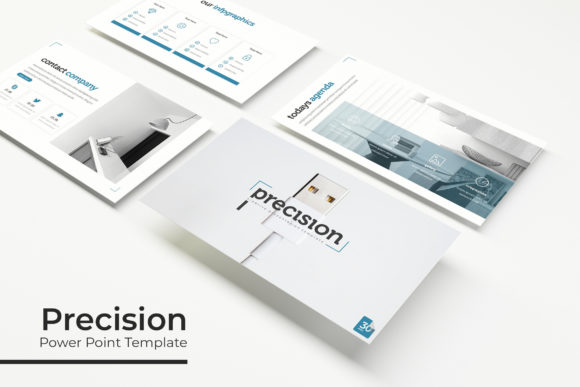
What sets this resource apart is its sheer volume and versatility. With over 150 total slides distributed across five premade color themes, the Precision Power Point Template offers a comprehensive ecosystem for visual communication. Each of the five color variations provides 30 unique slides, meaning you aren't just getting a single layout in different hues; you are getting a curated design experience tailored to specific brand aesthetics. Whether you are pitching to a corporate client who expects a sleek, dark aesthetic or a lifestyle brand that thrives on vibrant, energetic visuals, the variety here ensures you aren't forced to compromise your brand identity to fit a generic mold.
Beyond the Slides: A Toolkit for Modern Branding
While the primary function of this asset is clearly for slide decks, the utility of the Precision Power Point Template extends far beyond the conference room. The inclusion of handcrafted infographics, section break slides, and dedicated gallery layouts makes it a viable design asset for a variety of content needs. Consider the workflow of a busy content creator or a small business owner managing their own marketing. They often need to repurpose content for social media graphics, blog headers, or digital product mockups. Because the template is built on Master Slides and features resizable, editable graphics with drag-and-drop picture placeholders, it functions much like a simplified design software.
Imagine you are launching a new product and need a quick lookbook for your website. Instead of hiring a designer for a one-off project, you can utilize the gallery and portfolio slides included in the template. The pixel-perfect illustrations ensure that even if you are resizing elements for a Pinterest pin or an Instagram story, the lines remain crisp and professional. This level of flexibility is crucial for maintaining visual consistency across different platforms. When your pitch deck, your social media assets, and your internal reports share the same design language, it reinforces brand recognition and builds trust with your audience.
Practical Applications for Design and Communication
The true test of any design template is its adaptability to real-world scenarios. The Precision Power Point Template is designed with practical application in mind, offering solutions for various professional challenges.
- Investor Pitches and Proposals: When seeking funding or closing a deal, the "story" of your business needs to be told visually. The structured layouts allow you to guide the viewer’s eye from the problem statement to the solution, using infographics to simplify complex data.
- Internal Reporting: Marketing teams often struggle with making quarterly reports engaging. Using the section break slides and data visualization tools within the template transforms dry statistics into a narrative that stakeholders can easily digest.
- Webinars and Workshops: For educators and coaches, the layout variety supports different teaching methods. You can use text-heavy slides for definitions, image-centric slides for case studies, and split-screen layouts for Q&A sessions.
- Digital Lookbooks: For those in e-commerce or creative industries, the portfolio slides serve as an excellent foundation for digital catalogs. The picture placeholders allow you to swap out product shots quickly, creating a professional browsing experience for potential customers.
Furthermore, the file structure included in the package—5 PPTX files and 5 PPTX Widescreen files—ensures compatibility with modern display setups. In an era where presentations are often viewed on wide monitors or projected onto massive screens, having a native widescreen format prevents the awkward black bars or stretched images that plague older templates.
Design Efficiency and Technical Precision
One of the most significant pain points in design work is the technical friction involved in customization. Many premium templates look beautiful in the preview but become nightmares to edit because they aren't built on a stable foundation. The Precision Power Point Template addresses this by being strictly based on Master Slides. This architecture means that global changes—such as updating a font or shifting a color tone—can be applied across the entire deck in seconds rather than hours.
The drag-and-drop functionality is another critical feature for efficiency. For the entrepreneur who isn't a Photoshop wizard, the ability to simply drag an image into a shape placeholder is a game-changer. It removes the barrier to entry for high-level design, allowing users to focus on the content rather than wrestling with software tools. This is particularly helpful when creating marketing assets under tight deadlines. If a social media manager needs to turn a slide into a Facebook cover photo, the ease of use allows for a rapid turnaround time.
Additionally, the attention to detail in the typography and layout ensures a professional finish. The clean lines and organized hierarchy guide the user in arranging their own content. It teaches good design habits by example; by filling in the placeholders, users inadvertently learn about balance, white space, and visual weight. This is invaluable for small business owners who are building their own brand identity from the ground up.
Maximizing Your Investment: Tips for Implementation
To get the most out of the Precision Power Point Template, it helps to approach it with a strategy rather than just treating it as a set of pretty slides. Here are a few ways to integrate this asset into your broader design workflow:
- Establish Your "Base" Theme: While five color variations are provided, choose one that aligns most closely with your primary brand guidelines. Use this as your standard for internal documents and proposals to build consistency.
- Create a "Swipe File": Don't feel obligated to use the slides in their original order. Treat the 150+ slides as a library. When you need a specific layout—like a timeline or a comparison chart—pull that specific slide into your working deck.
- Pair with High-Quality Imagery: The template notes that preview photos are for illustration only. This is a prompt to invest in good stock photography or your own product photography. The clean design of the template will highlight your images, so ensure those images are high-resolution.
- Use for Print Collateral: Because the graphics are vector-based and editable, you can adapt these layouts for print materials. A slide layout can easily be exported as a PDF and adjusted for a flyer, a menu, or a one-page brochure.
The inclusion of a "Readme First" file and links to free fonts is a subtle but important detail. It ensures that the typography renders correctly on your system, preserving the intended aesthetic of the design. In the world of digital assets, these small logistical touches often determine whether a product is truly "plug-and-play" or requires hours of troubleshooting.
Ultimately, the goal of any design asset is to reduce the friction between your idea and its execution. Whether you are finalizing a keynote speech, designing a pitch deck for a new client, or creating a visual report for your team, having a reliable, professional, and flexible template at your disposal changes the dynamic of your work. It allows you to present your ideas with the confidence that comes from knowing your visuals are just as sharp as your strategy. The Precision Power Point Template