Transform Your Presentations with Moarize Google Slide Template
Creating a presentation that truly captivates an audience requires more than just good information; it demands a visual narrative that is both cohesive and compelling. For professionals, entrepreneurs, and creatives, the tool used to build that narrative can make all the difference. This is where the Moarize Google Slide Template enters the scene, offering a comprehensive design system built to elevate any presentation from mundane to memorable. It’s not merely a set of slides, but a versatile framework for visual communication.
A Foundation for Visual Consistency and Brand Recognition
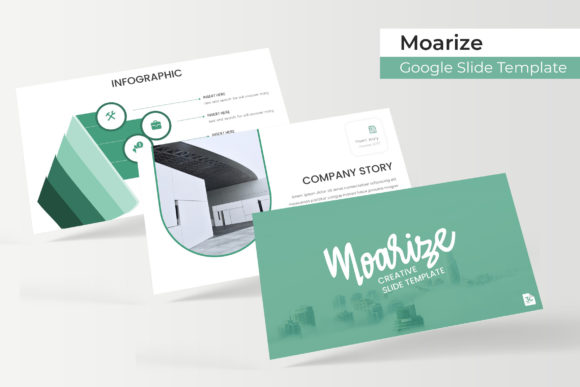
One of the biggest challenges in any professional setting is maintaining a consistent brand identity across all touchpoints. The Moarize template addresses this head-on with its structured approach. With over 150 total slides organized across five premade color palettes, it provides a robust starting point for establishing a unified look. Each of the five color variations offers 30 meticulously designed slides, allowing you to select a scheme that aligns perfectly with your existing brand guidelines or helps you define a new one.
This level of built-in consistency is invaluable. Whether you're a small business owner crafting a pitch deck, a marketer developing a campaign overview, or a designer preparing a client portfolio, starting with a cohesive template ensures that every slide reinforces your brand's visual language. The pixel-perfect illustrations and handcrafted infographics are not just decorative; they are functional design assets that help translate complex data into clear, engaging stories. This focus on polished, professional presentation directly contributes to improved brand recognition and audience trust.
Practical Design for Real-World Projects
The true test of any design asset is its utility in practical applications. The Moarize Google Slide Template excels here due to its thoughtful, user-centric features. The inclusion of dedicated section break slides helps structure your narrative, guiding your audience through a logical flow. Gallery and portfolio slides offer ideal layouts for showcasing work, products, or case studies, making it an excellent choice for creative professionals and agencies.
Perhaps the most significant time-saver is the use of master slides and resizable, editable graphics with picture placeholders. This drag-and-drop functionality, based on the master slide architecture, means you can update logos, swap images, or adjust layouts globally with minimal effort. It empowers users who may not be design experts to create presentations that look professionally crafted. For content creators and bloggers, this means turning a tutorial or a product review into a visually dynamic slide deck for social media or workshops. For entrepreneurs, it means building investor decks or sales pitches that look as polished as their ideas are innovative.
Integrating Moarize into Your Creative Workflow
Thinking beyond the traditional boardroom presentation, the components of the Moarize system can serve as foundational design elements for broader projects. The handcrafted infographics and illustrations can be extracted and adapted for use in social media graphics, enhancing your Instagram Stories or LinkedIn posts with professional visual data. The clean layouts and typographic hierarchy can inspire the design of digital products like eBooks or lead magnets, ensuring a seamless visual experience from slide to document.
When considering typography for any project, including presentations, pairing is key. The included readme file with font download links is a crucial resource. While the template itself provides a visual style, understanding how to pair the recommended fonts with others for your broader brand identity is essential. For instance, you might use the template's suggested display font for headings in your slides and pair it with a clean, readable sans-serif font for body text in your website or printed materials. This creates a harmonious yet functional typographic system across all your marketing assets.
Key Considerations for Maximum Impact
To get the most out of the Moarize template, or any premium design asset, a strategic approach is beneficial. Start by reviewing all 30 slides within your chosen color variation to understand the full range of layouts available—title slides, content slides, data visualization slides, and conclusion slides. This prevents you from overlooking a layout that might be perfect for a specific piece of information.
Customization is where your brand's personality shines through. While the template provides a stunning starting point, adapt the color palettes to match your exact brand hex codes, and replace placeholder images with your own high-quality photography or graphics. Remember, the provided images are for illustration only, so sourcing your own visuals is a necessary step for authenticity. Finally, always review the licensing for any font or asset you use. The Moarize package includes clear information on font usage, which is critical for any commercial project, from client work to merchandise and digital products.
Ultimately, a tool like the Moarize Google Slide Template is about more than just aesthetics; it's about efficiency and professionalism. It provides a structured, visually appealing canvas that allows you to focus on your message and your audience, confident that the visual delivery will be crisp, engaging, and perfectly aligned with your brand's story.