Pastelle: A Keynote Template for Polished, Professional Presentations
We’ve all been there. The meeting is tomorrow, the data is ready, but the thought of staring at a blank slide deck is paralyzing. You want something that looks sharp, cohesive, and professional without spending hours fiddling with alignment and color schemes. This is precisely the kind of daily friction a well-designed template solves, and why tools like the Pastelle Keynote Template have become essential for busy professionals, entrepreneurs, and creatives. It’s not just about having pre-made slides; it’s about having a flexible design system at your fingertips that lets you focus on your message, not your margins.
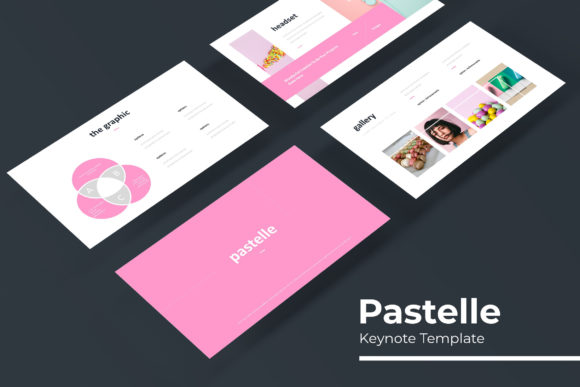
So, what sets this particular collection apart? The core offering is built around versatility and volume. With over 150 total slides structured across five distinct, premade color palettes, you get 30 meticulously crafted slides for each color scheme. This isn't just a recolor of the same layout. Each variation is designed with its own subtle personality, allowing you to select a base that best resonates with your brand’s energy—whether that’s cool and corporate, warm and inviting, or bold and innovative. The foundation of these designs is pixel-perfect illustrations and handcrafted infographics. This means the charts, timelines, and data visualizations aren't generic clip art; they are clean, modern vector graphics that maintain their crispness at any size, ensuring your data looks as sharp as your narrative.
Beyond Aesthetics: The Practical Engine of Your Workflow
The real value of a premium presentation asset lies in how it integrates into your actual work process. A common pain point with lesser templates is inflexibility. You find a layout you like, but changing the image placeholder is a nightmare of cropping and repositioning. The Pastelle template addresses this head-on with its resizable and editable graphics and intuitive picture placeholders. The drag-and-drop functionality, built upon a robust Master Slides system, means swapping in your team headshots, product photos, or portfolio images is a seamless, one-click operation. This saves a tremendous amount of time, especially when you’re preparing for a pitch, a client review, or a webinar and need to make last-minute visual updates without breaking the layout.
Furthermore, the inclusion of section break slides is a subtle but powerful feature for audience engagement. A well-placed section divider provides a visual pause, helps reorient your audience during a complex talk, and gives your presentation a rhythmic, professional flow. Similarly, the dedicated Gallery and Portfolio slides are a godsend for designers, photographers, architects, and agencies. Instead of struggling to create a balanced grid from scratch, you have beautifully spaced, responsive frames ready to showcase your work in a clean, compelling manner. This structure helps improve visual consistency, which is a cornerstone of strong brand recognition and professional presentation.
Matching the Template to Your Mission
Choosing a presentation template is a strategic decision. It’s not just about what looks pretty; it’s about what aligns with your communication goals. The Pastelle template’s range of 30 slides per color scheme offers a toolkit for various contexts. The clean, infographic-heavy slides are perfect for marketing reports, startup pitch decks, and data-driven business reviews. The gallery layouts serve creative portfolios and project proposals. The minimalist text slides with strong typographic hierarchy are ideal for editorial layouts, keynote speeches, and educational content where readability is paramount.
Think about your audience. Are you presenting to investors who need to quickly grasp financials and market fit? The chart-focused slides will be your best friend. Are you onboarding new team members and need to communicate culture and processes? The combination of icon-driven lists, team section layouts, and quote slides will help you tell that story humanly. The template becomes a framework for your thinking, ensuring that no matter what you’re presenting—whether it’s a brand identity proposal, a social media strategy, or a product launch plan—the visual foundation is solid, modern, and trustworthy.
Maximizing Your Design Asset: What’s Included and How to Use It
When you invest in a tool like this, knowing exactly what you’re getting ensures you can hit the ground running. The package includes 5 PPTX Files in widescreen format, each corresponding to one of the five premade colors. You also get a crucial Readme First file. Do not skip this. It typically contains the link to download the free font used in the design. Using the specified typeface is key to maintaining the intended aesthetic, as the typography is carefully paired with the slide layouts. The fonts chosen for such templates are often modern, sans-serif families that prioritize on-screen readability and a clean look.
A pro tip for using this kind of asset effectively is to start by duplicating the file. Keep one pristine, original version as your master source. Work from the copy. This allows you to experiment, delete slides you don’t need, and customize freely without ever losing the original structure. Because the graphics are vector-based, you can often ungroup them and tweak individual shapes or colors to match your exact brand guidelines, extending the utility of the template even further.
Finally, a note on licensing for the entrepreneur or small business owner. The templates are typically provided with a license for commercial use, meaning the final presentation you create for a client or for your own business is yours to use. However, it’s always prudent to review the specific license terms included in the readme file to understand any restrictions, such as not redistributing the original template source files themselves. This ensures you’re using your design assets ethically and legally as you build your brand and communicate your vision.
In the end, a great presentation template is about reducing cognitive load. It handles the visual heavy lifting so your energy can be directed toward crafting a compelling story, persuading your audience, or sharing your expertise. By providing a structured yet adaptable canvas, tools like the Pastelle Keynote Template empower you to present your ideas with clarity and confidence, every single time.