Designing with Quiet Confidence: The Introvert Google Slide Template
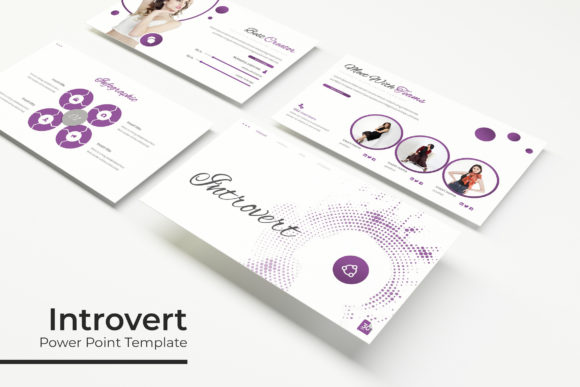
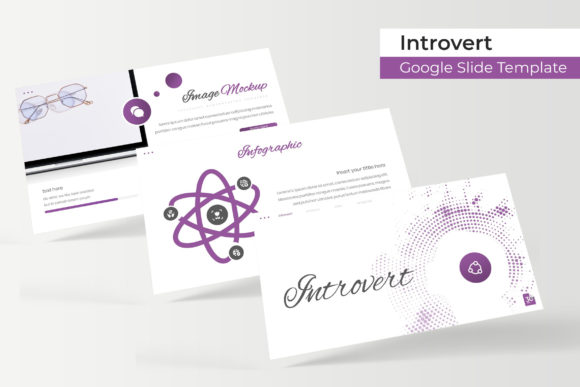
There's a particular kind of elegance in restraint. In a world saturated with neon gradients, aggressive animations, and visual noise competing for every ounce of attention, the most memorable presentations often belong to those who understand the power of a well-placed pause. The Introvert Google Slide Template isn't about being shy—it's about crafting a narrative that speaks through thoughtful composition, intentional whitespace, and a color palette that whispers rather than shouts. For designers, entrepreneurs, and content creators who believe that clarity is the ultimate form of sophistication, this template collection offers something genuinely refreshing.
A Library of 150+ Slides Built Around Five Moods
What immediately sets this collection apart is its sheer depth. With over 150 total slides distributed across five premade color themes—30 slides per variation—you're not buying a single template. You're investing in a versatile design system that adapts to different brand personalities and project contexts without requiring you to start from scratch each time.
Each color variation carries its own emotional weight. Whether you lean toward muted earth tones for a wellness brand, cool slate blues for a fintech pitch, or warm neutrals for a lifestyle blog presentation, the palette options let you match your visual identity with precision. The handcrafted infographics embedded throughout each theme aren't generic clip art repurposed from stock libraries. They feel purposeful—data visualizations, process diagrams, and comparison charts designed to support a story rather than distract from it.
This matters more than most people realize. When your slides look cohesive from the first title card to the final call-to-action, your audience trusts you faster. Visual consistency isn't decoration; it's credibility made visible.
Practical Features That Save Real Time
Anyone who has spent an evening wrestling with misaligned text boxes and stubborn image placeholders knows that a beautiful template means nothing if it's frustrating to customize. The Introvert Google Slide Template addresses this head-on with master slide architecture. Every element—typography, color fills, graphic placements—ties back to a centralized master, which means you can rebrand an entire deck in minutes rather than hours.
The resizable and editable graphics are another practical win. Drag-and-drop picture placeholders let you swap in your own photography or illustrations without fiddling with crop ratios or layer ordering. For small business owners juggling marketing, operations, and content creation simultaneously, this kind of frictionless editing isn't a luxury. It's a lifeline.
Pixel-perfect illustrations round out the experience. These aren't blurry exports or vector files that lose their crispness at different resolutions. Whether you're projecting on a conference screen or embedding slides into a digital proposal, the visual quality holds up. That attention to technical detail reflects a design philosophy worth emulating in your own work.
Five Color Palettes, Five Brand Stories
Think of the included color variations as starting points for different conversations. A creative agency pitching to luxury clients might gravitate toward the deepest, most restrained palette. A startup presenting growth metrics to investors might prefer the version with sharper contrast and bolder accent tones. A blogger preparing a media kit could find the softer, warmer option perfectly aligned with their editorial aesthetic.
This flexibility makes the Introvert Google Slide Template particularly valuable for freelancers and agencies who serve multiple clients. Instead of purchasing separate presentation kits for each project, you have a single foundation that transforms based on context. The section break slides—clean transitions that segment your narrative without visual clutter—keep audiences oriented throughout longer presentations. Portfolio and gallery slides give photographers, illustrators, and designers a structured yet elegant way to showcase work without competing with the work itself.
Beyond Presentations: Unexpected Creative Applications
While the template is built for Google Slides and PowerPoint, its design assets extend well beyond boardroom decks. The infographic elements can be extracted and repurposed for social media graphics—think Instagram carousels explaining a process, Pinterest pins featuring data points, or LinkedIn posts with branded visual summaries. The color palettes and typography choices can inform broader brand identity work, from packaging mockups to website hero sections.
Content creators working on digital products—ebooks, online course materials, lead magnets—will find the slide layouts surprisingly adaptable. A section break slide becomes a chapter divider. A portfolio layout transforms into a product showcase page. The master slide structure means these adaptations maintain visual integrity across different formats and sizes.
For editorial designers and bloggers, the clean hierarchy built into each slide translates naturally to print materials. Workshop handouts, event programs, and promotional posters all benefit from the same restrained sophistication that makes the presentation slides effective. The key is recognizing that good design systems are modular. Every component can be reimagined for a different medium while preserving the underlying visual logic.
Typography Choices That Support the Aesthetic
The fonts included with the template—free downloads with links provided in the readme file—complement the overall design philosophy. They're legible at both headline and body sizes, which matters enormously when you're presenting complex information to audiences who may be reading from the back row or scanning a shared screen on their phones.
When selecting fonts for your own projects, consider how the Introvert Google Slide Template balances serif and sans serif elements. Serif typefaces often convey tradition and editorial authority, while sans serif options feel more contemporary and approachable. The template's typography pairing demonstrates how these styles coexist without competing—a lesson worth applying to logo design, web design, and packaging projects alike.
Readability should always anchor your font decisions. A decorative script font might look stunning on a wedding invitation but becomes illegible on a mobile screen. The included fonts in this collection prioritize clarity without sacrificing personality, which is exactly the balance most professional projects demand.
What's Actually in the Box
The download includes five PPTX files in widescreen format, each corresponding to a different premade color theme. A readme file provides setup guidance and the free font download links so you can replicate the exact typographic treatment shown in previews. It's worth noting that the preview photographs and stock imagery are not included—they serve as illustrative placeholders to demonstrate layout potential. This is standard practice, and the drag-and-drop placeholders make inserting your own visuals straightforward.
For anyone evaluating whether this template fits their workflow, the master slide architecture alone justifies the investment. Rather than treating each slide as an isolated canvas, you're working within a system designed for efficiency and consistency. That distinction matters whether you're building a single investor pitch or maintaining an ongoing library of branded presentations for a growing business.
The Introvert Google Slide Template ultimately proves that restraint isn't limitation—it's a design choice that earns attention by respecting the audience's focus. In a landscape where louder rarely means better, that quiet confidence might be exactly what your next project needs.