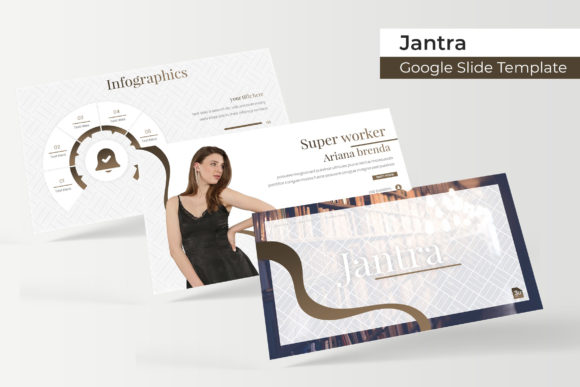
Jantra Google Slide Template: A Complete Presentation Toolkit
You've spent weeks refining your business strategy, perfecting your product, or crafting the perfect pitch. The last thing you want is for a clunky, generic presentation to undermine all that hard work. We've all sat through slide decks that felt like they were designed in 1998, and we know the subconscious effect it has: it makes the content feel less credible. The Jantra Google Slide Template is built for professionals who understand that how you present your ideas is just as important as the ideas themselves. It’s not just a collection of slides; it's a comprehensive visual system designed to make your message clear, compelling, and professional.
More Than Just Slides: A Visual System for Your Brand
At its core, Jantra is a presentation toolkit that prioritizes both form and function. With 150+ total slides built on a master slide framework, it offers a level of structure and consistency that’s hard to find. The template is organized into five distinct color variations, each containing 30 meticulously designed slides. This isn't about just swapping a background color; each color scheme is a fully realized design direction, allowing you to choose a palette that aligns perfectly with your brand identity or the specific mood of your project. Whether you're presenting a sleek tech startup, a warm and inviting lifestyle brand, or a bold creative agency, there's a color story ready for you.
What truly sets this toolkit apart is its attention to practical, real-world needs. The inclusion of handcrafted infographics is a game-changer for anyone who regularly presents data, processes, or complex information. Instead of struggling to build a flowchart or a timeline from scratch, you have a library of editable, visually engaging graphics at your fingertips. Similarly, the dedicated section break slides and gallery/portfolio slides are thoughtful additions. They provide natural breathing points in your narrative and give your best work the spotlight it deserves, all while maintaining a cohesive visual flow throughout the deck.
Designed for Speed and Simplicity in Your Workflow
Time is a non-renewable resource, especially for entrepreneurs, marketers, and designers juggling multiple projects. The Jantra template is engineered to respect that reality. The drag-and-drop picture placeholder system is intuitive, letting you replace dummy images with your own photos in seconds. Because the graphics are resizable and editable, you can adapt any slide to your specific content without breaking the design. This pixel-perfect approach means you spend less time fiddling with alignments and more time refining your message.
The foundation of this ease of use is its master slide architecture. Every element is built on a consistent grid, ensuring that your fonts, colors, and spacing remain uniform across all 150+ slides. This creates a seamless experience for your audience and a stress-free editing process for you. The package includes five PPTX files for standard formats and five PPTX widescreen files, covering the most common presentation dimensions. You also get a Readme First document and links to the free fonts used in the template, so you can achieve the exact look shown in the previews without hunting for typefaces.
Practical Applications Across Industries
The versatility of a well-structured template like this is where its value truly shines. It’s not just for boardroom pitches. Consider these applications:
- For Agencies and Freelancers: Use the gallery and portfolio slides to create stunning case studies for client presentations. The clean infographics are perfect for explaining your creative process or marketing funnels.
- For Small Businesses and Startups: Develop investor decks, company overviews, or product launch presentations that look polished and investor-ready. The consistent branding reinforces your professionalism.
- For Educators and Consultants: Transform complex training materials or workshop content into engaging, easy-to-follow visual narratives. The section breaks help organize lessons or modules effectively.
- For Marketers and Content Creators: Design compelling webinars, social media content series, or internal strategy documents. The modern typography and layouts are optimized for clarity and engagement.
The template also serves as an excellent starting point for developing broader brand collateral. The color palettes, font pairings, and graphic styles can be extrapolated to inform your website design, social media graphics, and even print materials, helping you build a more cohesive brand identity across all touchpoints.
Key Features That Deliver Real Value
Let's break down the tangible components included in this package and why they matter:
- Five Premade Color Schemes: This gives you immediate creative direction and flexibility. You’re not locked into one look, allowing the template to serve multiple clients or projects.
- 150+ Total Slides (30 per color): A vast library ensures you’ll find layouts for almost any type of content, from data-heavy slides to image-focused narratives.
- Handcrafted Infographics: Professionally designed data visualization slides save hours of work and elevate the credibility of your information.
- Section Break & Portfolio Slides: These are often overlooked in generic templates. Their inclusion shows a deep understanding of presentation flow and storytelling.
- Master Slides & Drag-and-Drop Placeholders: This is the engine of efficiency. It guarantees design consistency and makes customization incredibly fast, even for non-designers.
- Complete File Package: Receiving both standard and widescreen PPTX files, along with font information, means you have everything you need to get started immediately.
A important note to remember, as stated in the template details: the photographs and pictures used in the preview are for illustration purposes only and are not included. This is standard practice, but it means you'll need to source your own high-quality images to bring your slides to life. This is actually an advantage, as it forces you to use imagery that is uniquely relevant to your brand and message, rather than relying on generic stock photos.
Making the Most of Your Investment
Simply downloading the template is only the first step. To truly leverage the Jantra Google Slide Template, consider these practical tips:
- Customize, Don’t Just Populate: Use the provided color schemes as a starting point. Adjust the hex codes to match your exact brand colors. Swap the suggested fonts with your brand’s primary typeface if you have one. The goal is to make it yours.
- Focus on Your Content Hierarchy: Use the provided layouts to structure your narrative. The clear headings, subheadings, and content blocks are designed to guide your audience’s eye. Don’t fight the structure; use it to clarify your message.
- Source Quality Visuals: Invest time in finding or creating compelling images, icons, and graphics that align with your topic. The placeholder system makes swapping easy, so the quality of your visuals will define the final impact.
- Test on Multiple Screens: Before your big presentation, always preview your slides on the device and projector you’ll be using. Check for font rendering, color accuracy, and layout integrity.
Ultimately, a template like Jantra is a powerful design asset. It provides the professional framework, visual consistency, and time-saving functionality that allow you to focus on what you do best: sharing your expertise, telling your story, and moving your audience to action. It’s a practical tool for anyone who values clear communication and polished presentation in their professional or creative work.