Desgar: A Flexible Google Slides Template for Cohesive Branding
Creating a presentation that truly resonates with your audience involves more than just dumping text and images onto slides. It’s about visual storytelling, maintaining a consistent brand voice, and ensuring every element works in harmony to deliver your message. For many professionals—whether you’re a startup founder pitching investors, a marketer outlining a campaign, or a freelancer showcasing your portfolio—the design process can be a significant time sink. This is where a versatile template system like the Desgar Google Slide Template comes into play, offering a structured yet adaptable foundation for your visual communications.
A System Built for Visual Consistency
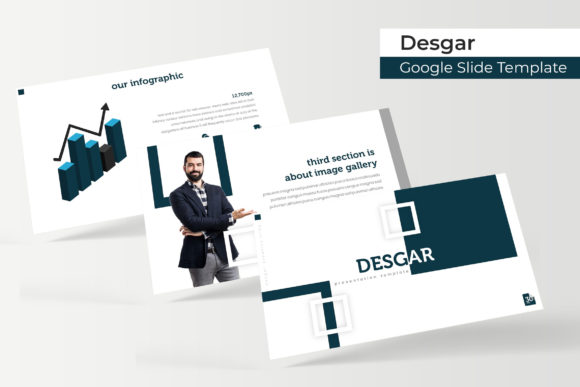
The core strength of the Desgar template lies in its systematic approach to design. With over 150 total slides organized into five distinct color variations, each containing 30 meticulously crafted slides, it provides a comprehensive toolkit. This isn’t just about having more slides; it’s about having the right slide for every part of your narrative. Need to present complex data? There’s a handcrafted infographic slide for that. Want to highlight your work? The dedicated gallery and portfolio slides are designed to make your visuals pop. The inclusion of section break slides helps to structure your presentation logically, guiding your audience through your story with clear visual cues.
From a practical standpoint, the pixel-perfect illustrations and resizable, editable graphics ensure that your final output looks sharp on any screen, from a laptop to a large projector display. The drag-and-drop picture placeholders simplify the process of adding your own images, making customization accessible even to those with minimal design experience. Because the entire template is based on master slides, making global changes—like adjusting a font or shifting a color accent—is efficient and consistent across all your slides. This master slide foundation is crucial for maintaining brand integrity, especially when multiple team members might be working on the same presentation file.
Practical Applications Across Industries
Consider how this level of structured flexibility applies to different projects. For a small business owner, the five premade color palettes offer a quick way to align the presentation with existing brand guidelines. You can select the color scheme that best matches your logo and brand identity, then use the consistent slide designs to reinforce recognition. The portfolio slides are particularly valuable for creatives—photographers, designers, or agencies—looking to present their work in a clean, professional manner that doesn’t distract from the content itself.
Entrepreneurs and startup teams will find the infographic slides indispensable for explaining business models, market analysis, or product features. Instead of struggling to create charts and diagrams from scratch, you have a library of pre-designed, editable graphics that can be tailored to your specific data. This not only saves hours but also elevates the perceived professionalism of your pitch. For internal communications, like quarterly reports or team training modules, the template’s clear structure helps in presenting information methodically, improving readability and audience engagement.
Beyond formal presentations, the assets included with Desgar have utility in broader design projects. The handcrafted infographics and icons can be repurposed for social media graphics, website banners, or blog post visuals, ensuring a cohesive look across all your digital platforms. The fact that the files are provided in PPTX format (both standard and widescreen) means you can easily export individual slides or elements as images for use in other software, effectively turning your presentation template into a mini design asset library.
Maximizing the Template: Tips for Effective Use
To get the most out of a template system like this, start with your content. Before you even open the file, outline your key messages and the logical flow of your presentation. This will help you select the most appropriate slides from the 150+ options, rather than trying to force your content into a design that doesn’t quite fit. Think of the slides as modular components; you might use the title slide from one color variation and the data slide from another if it better serves your narrative, provided you maintain a consistent color and font scheme throughout.
Typography plays a vital role in readability and brand tone. The Desgar template includes a recommended font (with a free download link), which is a thoughtful touch for ensuring the design looks as intended. However, don’t be afraid to experiment with font pairings if your brand has specific typefaces. The key is to maintain hierarchy—a clear distinction between headings, subheadings, and body text. Test your final presentation on different devices to ensure text is legible and visual elements are crisp. The resizable graphics are a major advantage here, allowing you to adjust scale without losing quality.
Remember that all the photographs and pictures used in the preview are for illustration only and are not included. This is standard practice, but it’s a crucial reminder to source your own high-quality images. Your visuals are what will ultimately make the presentation feel unique and authentic to your brand. Use the picture placeholders as guides for composition, but invest time in selecting or creating images that tell your specific story.
Final Thoughts on Streamlining Your Workflow
Ultimately, tools like the Desgar Google Slide Template are about efficiency and professionalism. They remove the initial friction of designing from a blank canvas, allowing you to focus on refining your message and strategy. For the busy professional—whether you’re wearing the hat of a designer, marketer, or founder—having a reliable, versatile design system at your fingertips can mean the difference between a rushed, inconsistent deck and a polished, persuasive presentation. By leveraging its structured slides, customizable infographics, and cohesive color systems, you can create visual communications that not only look good but also work harder to achieve your goals, be it winning a client, educating a team, or selling a product.