Pricetag: Your All-in-One Google Slides Template Solution
You have a brilliant idea, a solid business plan, and a presentation to build. But staring at a blank slide deck can feel paralyzing. How do you create something that looks polished, professional, and on-brand without spending hours designing from scratch? This is where a versatile toolkit like the Pricetag Google Slide Template becomes a game-changer, transforming your workflow from frustrating to fluid.
Beyond Basic Slides: A Visual Communication Powerhouse
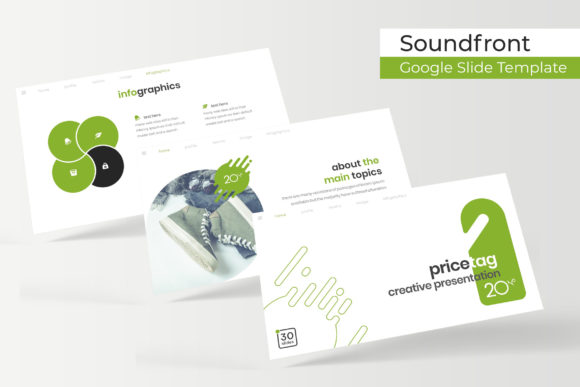
Forget the notion of slideshows as simple text-and-image affairs. The Pricetag template is built for visual storytelling. It’s a comprehensive design system packed into a familiar presentation format. With over 150 total slides organized into five distinct color themes, you get a massive library of ready-to-use layouts. Each of the five color variations provides 30 meticulously crafted slides, ensuring you have the right structure for any part of your narrative, from a powerful opening to a detailed data breakdown.
What sets this apart is the attention to design detail. The handcrafted infographics aren't just decorative; they are tools for making complex information digestible and engaging. Section break slides provide clean transitions, while dedicated gallery and portfolio slides offer a stunning way to showcase your work, products, or case studies. This isn't just a collection of slides; it's a curated visual language designed to communicate with clarity and impact.
Practical Applications for Real-World Projects
The true value of a template like Pricetag lies in its adaptability across countless professional scenarios. For a small business owner pitching to investors, the pixel-perfect illustrations and structured layouts lend instant credibility. A content creator can use the portfolio slides to create a visually stunning media kit for brand partnerships. Marketers will find the infographic slides invaluable for presenting campaign results or market analysis in a way that clients actually understand.
Consider these practical uses:
- Brand Identity & Pitch Decks: Build a cohesive brand presentation that communicates your mission, values, and offerings with visual consistency.
- Marketing & Sales Assets: Create compelling sales proposals, quarterly business reviews, or product launch presentations that hold attention.
- Educational & Workshop Materials: Design training modules, webinar slides, or course content that is both informative and visually stimulating.
- Creative Portfolios: Showcase graphic design work, photography, interior design projects, or any creative service in a professional, interactive format.
- Internal Communications: Elevate company meetings, project updates, and strategy sessions with clear, well-designed visuals that improve team engagement.
Mastering the Template: Efficiency Meets Customization
A powerful tool is only good if it’s easy to use. This is where the template’s user-centric features shine. Being based on Master Slides means that global changes—like updating a color scheme or font family—can be applied across the entire presentation with a few clicks. This ensures brand consistency and saves a tremendous amount of time.
The inclusion of resizable and editable graphic picture placeholders is a standout feature. You can simply drag and drop your own images into pre-designed frames, instantly making the template your own. This removes the technical barrier of image formatting and allows you to focus on your content. Furthermore, the use of free, widely available fonts (with download links provided) means you won’t encounter frustrating licensing issues or missing font errors when sharing your final presentation.
Integrating with Your Broader Design Ecosystem
While the core deliverables are Google Slides and PowerPoint files, the design thinking behind Pricetag can inform your entire visual strategy. The cohesive color palettes and design elements can inspire your logo design choices, social media graphics, and website aesthetics. The way information is structured on the infographic slides can guide how you present data on your blog or in print materials.
Think of this template not as an isolated product, but as a foundational design asset. The principles of clear hierarchy, balanced composition, and strategic color use demonstrated in these slides are the same principles that make for effective packaging design, editorial layouts, and merchandise branding. By working with a well-designed template, you’re also training your eye for what makes professional typography and modern graphic design work.
Getting Started: Tips for a Flawless Presentation
To make the most of this resource, begin by selecting the color theme that best aligns with your brand or the mood of your topic. Don’t just pick your favorite color; choose the one that evokes the right emotional response from your audience. Next, review the slide library and plan your narrative arc. Which slides will you use for your introduction? Which infographic best represents your key data point? Planning your flow before you start adding content will result in a more coherent story.
When customizing, leverage the drag-and-drop placeholders for images to maintain clean lines and professional spacing. Use the master slide feature to ensure every slide adheres to your chosen style. Finally, remember that the template is a starting point. Your unique voice, compelling data, and clear message are what will ultimately resonate. The Pricetag Google Slide Template provides the professional canvas; you provide the masterpiece.