Coat Keynote Template: Designing with Impact and Clarity
Creating a presentation that truly captures your audience's attention requires more than just compelling content; it demands a visual framework that is both professional and adaptable. The Coat Keynote Template offers a robust solution, built on a foundation of modern design principles and practical functionality. It's not just a collection of slides, but a versatile design system engineered to help you communicate ideas with precision and style, whether you're pitching to investors, teaching a workshop, or launching a new product.
A Foundation of Visual Harmony and Professional Polish
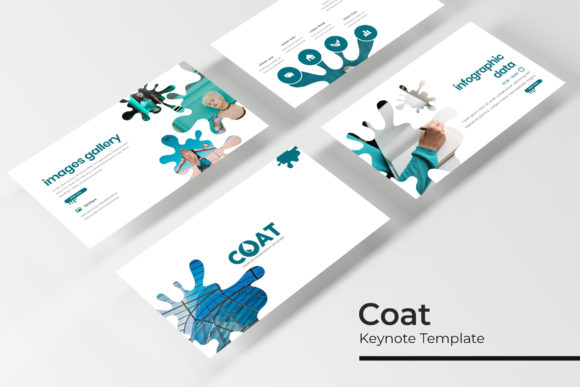
At its core, the Coat template is defined by its commitment to visual consistency. With over 150 total slides organized across five premade color themes, each containing 30 meticulously designed slides, it provides a cohesive starting point for any project. This structure eliminates the guesswork from color theory and layout. Instead of spending hours aligning elements or searching for complementary hues, you can focus your energy on your narrative. The five color variations are not arbitrary; they are carefully curated palettes designed to evoke specific moods—from corporate seriousness to creative vibrancy—allowing you to match the template's aesthetic to your brand's personality instantly.
The real power lies in the details. Each slide is crafted with pixel-perfect illustrations and handcrafted infographics, transforming complex data into digestible, engaging visuals. Think of a marketing report: instead of a dense table of numbers, you can present a sleek, editable chart that tells a story at a glance. For a small business owner, this means your quarterly review to stakeholders becomes a compelling visual journey, not a tedious data dump. The inclusion of section break slides and dedicated gallery/portfolio layouts further streamlines the process, helping you organize your content logically and showcase your work, be it product photography, design mockups, or client testimonials, in a polished manner.
Practicality for the Busy Creative and Business Professional
Time is a precious resource, and the Coat template is designed to respect it. The drag-and-drop picture placeholders are a game-changer. You don't need to be a graphic design expert to insert your images; simply drag your photo onto the placeholder, and it automatically crops and scales to fit perfectly within the designated frame. This feature is invaluable for content creators and marketers who need to produce high-quality presentations quickly. Imagine preparing for a last-minute webinar: you can populate the slides with your branding and content in minutes, confident that the final product will look sharp and intentional.
Furthermore, the template's foundation on master slides ensures global control. Need to change the font across all 150+ slides? Adjust it once on the master slide, and the change cascades throughout the entire presentation. This is crucial for maintaining brand identity. A freelance designer can set up the master slides with a client's specific brand fonts and colors, then hand over a template that the client's team can use consistently for years. The resizable and editable graphics mean that every element—from icons to diagrams—can be scaled without loss of quality and modified to suit your exact needs, offering flexibility that static templates cannot match.
Beyond the Presentation: Integrating into Your Broader Brand Ecosystem
While built for Keynote, the principles and assets within the Coat template have applications that extend far beyond a single slide deck. The visual language it establishes can inform your entire brand identity. The clean lines, balanced compositions, and strategic use of whitespace in the template can serve as inspiration for your logo design, ensuring your mark feels at home in professional presentations. The color palettes can be extracted for use in social media graphics, creating a seamless visual thread between your Instagram stories and your investor pitch.
Consider the packaging for a new product line. The infographic styles within the template could inspire the informational graphics on your packaging, presenting ingredients or usage instructions in a clear, attractive way. The typographic hierarchy—how headings, subheadings, and body text are styled—provides a blueprint for editorial layouts in brochures or on your website's blog. By using the Coat template as a central design asset, you're not just making a presentation; you're developing a cohesive visual system that strengthens brand recognition across every touchpoint, from digital products to print materials.
Making It Your Own: Tips for Customization and Effective Use
To maximize the template's potential, start by selecting the color theme that best aligns with your project's goal. A deep blue theme might convey trust and stability for a financial report, while a vibrant orange could energize a creative workshop proposal. Once chosen, resist the urge to overhaul everything. The strength of a well-designed template is in its structure. Instead, focus on customizing the content and imagery.
When replacing placeholder text, maintain the established typographic hierarchy. If the template uses a bold sans-serif for headings and a clean serif for body text, keep that pairing. It was chosen for readability and visual rhythm. For your images, take the time to source or shoot high-quality photographs that match the tone of your presentation. A pixelated or poorly lit image can undermine even the most sophisticated design. Use the portfolio slides to tell a visual story about your brand's process or results, and leverage the infographic slides to simplify complex information, making your message more memorable and persuasive.
Finally, remember that this is a tool to enhance your communication, not replace it. The most stunning slides are wasted without a clear, practiced delivery. Use the visual support of the Coat template to reinforce your key points, guide your audience's attention, and create a professional atmosphere that builds credibility. Whether you're a startup founder seeking funding, a teacher designing a course, or a marketer planning a campaign, this template provides the polished, adaptable canvas you need to present your ideas with confidence and clarity.