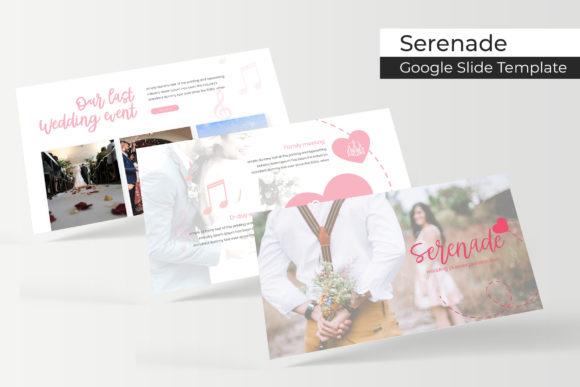
Unlocking Effortless Presentations with the Serenade Template
If you have ever found yourself staring at a blank slide deck at 10:00 PM with a presentation due the next morning, you know the specific kind of dread that comes with presentation design. It is rarely the content that slows us down—it is the layout. We know what we want to say, but we struggle to make it look good. This is exactly the friction point that the Serenade Google Slide Template aims to solve. It is designed not just to look beautiful, but to function as a robust design system that takes the guesswork out of visual communication.
What sets this particular asset apart from the thousands of generic templates available online is its sheer volume and versatility. We are not talking about a simple 10-slide starter pack. The Serenade package includes 150+ total slides, meticulously organized across 5 premade colors. This structure offers 30 slides for each template variation, ensuring that whether you are pitching a startup, presenting a quarterly financial report, or showcasing a creative portfolio, you have the specific visual tool required for the job.
The Architecture of Professional Visuals
For small business owners and content creators, consistency is the key to brand recognition. A disjointed presentation can confuse an audience, but a cohesive one builds trust. The Serenade template achieves this through pixel-perfect illustrations and a layout strategy based on Master Slides. This means that every element, from the placement of text boxes to the alignment of images, is anchored to a professional grid. You are not just getting pretty slides; you are getting a framework that enforces good design principles automatically.
One of the most practical features for busy professionals is the drag & drop functionality combined with resizable and editable graphics. In the past, editing a presentation template often meant breaking the layout or struggling with locked elements. Here, the graphics are crafted to be flexible. If you need to move a chart or resize an infographic to fit a specific data point, you can do so without ruining the aesthetic integrity of the slide. This adaptability is crucial for anyone who needs to tailor their message to different audiences while maintaining a polished look.
Visualizing Data with Handcrafted Infographics
Data is only as powerful as your ability to communicate it. We have all seen presentations where the numbers are lost in a cluttered Excel chart pasted onto a slide. The Serenade template takes a different approach with handcrafted infographics. These are not generic chart tools; they are designed visual assets that turn statistics into stories.
For marketers and brand strategists, this is a game-changer. When presenting campaign results or market analysis, a well-designed infographic can highlight trends that might otherwise go unnoticed. The inclusion of Section Break Slides also helps in pacing your narrative. These slides act as visual pauses, signaling to your audience that you are shifting topics, which helps maintain focus and engagement throughout a long presentation.
Furthermore, the inclusion of dedicated Gallery and Portfolio slides makes this template ideal for creatives. Whether you are a photographer, interior designer, or freelance writer, the way you display your work matters. The grid layouts provided are optimized to showcase high-resolution images without overwhelming the viewer. By using the picture placeholder feature, you can easily insert your own work, allowing your portfolio to take center stage rather than the slide design itself.
Practical Applications Across Industries
The versatility of the Serenade Google Slide Template extends far beyond the boardroom. Because it includes 5 PPTX Files and 5 PPTX Widescreen formats, it is ready for almost any scenario. Consider the entrepreneur pitching for funding: they need a deck that conveys stability and innovation. The clean lines and modern typography of Serenade provide that credibility.
On the other hand, consider the educator or workshop facilitator. They need slides that are readable from the back of a room. The template’s focus on readability and clear hierarchy ensures that key points stand out. Even for internal use, such as team training or project management updates, having a standardized template saves hours of formatting time. Instead of debating font sizes and colors, your team can focus on the actual content.
It is also worth noting the value of the 5 color variations. Color psychology plays a huge role in how your message is received. A financial consultant might opt for a blue or grey variation to evoke trust and security, while a lifestyle brand might choose a warmer, more vibrant palette. Having these options pre-built allows you to switch the entire mood of your presentation with a single click, ensuring it aligns perfectly with your specific brand identity or the emotional tone of your message.
Optimizing Your Workflow and Assets
Efficiency is a currency in the modern creative economy. The Serenade template is built on Master Slides, which is the professional standard for presentation design. This architecture ensures that if you decide to change a font or adjust a color scheme later in the process, the update propagates through the entire deck. It prevents the nightmare scenario of realizing on slide 40 that you forgot to update the font on slide 5.
The package comes with a Readme First file and links to free font downloads. This is a detail that separates premium assets from amateur ones. Typography is the voice of your design; if you open a file and the fonts are missing or substituted, the entire layout can break. By providing the resources to install the exact typefaces used in the design, the template ensures that what you see in the preview is exactly what you get when you open the file.
For those concerned about commercial licensing, the structure of this package suggests a professional-grade asset intended for serious use. Whether you are creating a presentation for a client, designing a digital product to sell, or preparing a keynote speech, the ability to use these graphics without legal ambiguity is essential. The "drag & drop" nature of the placeholders also means you can rapidly prototype ideas, swapping out images to test different visual narratives before committing to a final design.
Elevating Brand Identity
Ultimately, the tools we choose reflect our professional standards. Using a high-quality template like Serenade is not about taking shortcuts; it is about respecting your audience's time and attention. A pixel-perfect presentation signals that you care about the details. It suggests that if you put this much effort into the slides, you likely put the same amount of effort into your product or service.
For content creators and bloggers, these slides can even be repurposed. You can export individual slides as high-quality graphics for social media, creating a cohesive visual thread between your presentation and your Instagram or LinkedIn feed. The infographics can be extracted and used as standalone blog headers or downloadable resources for your audience. This multi-use potential maximizes the return on your investment, turning a single purchase into a versatile library of design assets.
In a world where visual noise is constant, clarity wins. The Serenade Google Slide Template provides the structure to present your ideas with clarity, the flexibility to adapt to your specific needs, and the aesthetic quality to leave a lasting impression. It allows you to stop worrying about the mechanics of design and start focusing on what you do best: communicating your vision.