Streamline Your Presentations with Desgar's Polished Templates
Every professional has been there: staring at a blank PowerPoint slide at 10 PM, trying to wrestle a jumble of data into a coherent, visually appealing presentation. You know the content is solid, but the default layouts feel stale, and cobbling together a design from scratch eats into time you don't have. This is where a well-structured template system changes the game. The Desgar Power Point Template isn't just a collection of pretty slides; it's a foundational toolkit designed for clarity, speed, and brand consistency across any professional narrative.
Architecture of a Modern Slide Deck
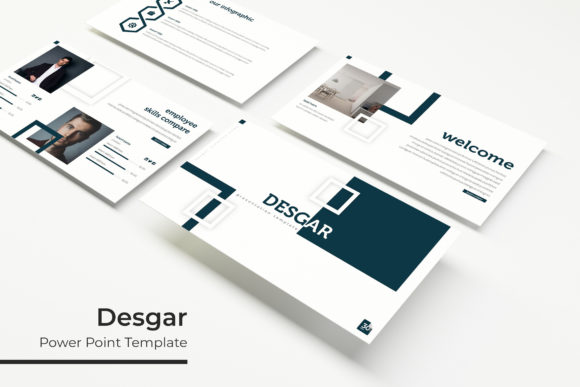
What separates a forgettable presentation from a persuasive one is often the invisible framework holding it together. Desgar offers a robust architecture with 150+ total slides, but the true value lies in its organization. You aren't handed a chaotic mess of 150 random designs. Instead, the package provides 5 premade color palettes, with 30 distinct slides curated for each specific color variation. This modular approach allows you to select a visual mood that aligns with your brand identity instantly. Whether you are pitching to investors, outlining a quarterly marketing strategy, or presenting a portfolio review, the structure is already there, waiting for your content.
The design language relies on clean, modern typography and generous whitespace. This isn't about flashy animations that distract; it's about visual hierarchy. When you open the PPTX file, you will notice that the layouts prioritize readability. Text blocks are sized for impact, and image placeholders are positioned to guide the viewer's eye naturally from the headline to the key takeaway. This focus on structure makes the template versatile enough for corporate boardrooms, creative agencies, and educational environments alike.
Visual Storytelling through Custom Assets
Data is often the hardest part of a presentation to visualize. A spreadsheet pasted onto a slide is an instant engagement killer. To combat this, Desgar includes handcrafted infographics that transform complex statistics into digestible visual stories. These aren't generic clipart icons; they are vector-based graphics designed to be resized and edited without losing quality. Whether you need to illustrate a sales funnel, a timeline of company milestones, or a comparative analysis, the graphic elements are built to be manipulated.
Furthermore, the inclusion of Section Break Slides is a subtle but powerful feature. These slides act as visual pauses, signaling to your audience that you are shifting topics. It helps in mental compartmentalization, keeping the viewer focused. For those in creative fields, the dedicated Gallery and Portfolio slides are particularly useful. These layouts utilize the "drag & drop" functionality based on Master Slides. You simply click the image placeholder, select your high-resolution photograph, and the template automatically crops and fits the image to the designated space. This pixel-perfect illustration capability ensures that your work—be it architectural designs, photography, or product mockups—looks professional without requiring advanced Photoshop skills.
Practical Applications for Brand and Business
While the primary function is a slide deck, the utility of the Desgar system extends into broader brand management. Visual consistency is the cornerstone of brand recognition. By utilizing the 5 PPTX Widescreen files, you can establish a standardized look for all internal and external communications. This consistency builds trust; when a client or partner sees a polished, cohesive presentation, it signals attention to detail and professionalism.
Consider the practical workflow for a small business owner or a marketing manager. You might be launching a new product and need to create a suite of assets. While PowerPoint is primarily for slides, the design assets within Desgar can be repurposed. You can design a slide, export it as a high-resolution image, and use it for a social media graphic or a blog header. The "Resizable and Editable Graphic" feature is crucial here. Because the elements are vectors, you can scale them up for a poster or down for a digital advertisement without pixelation.
For educators and content creators, the template serves as a backbone for educational materials. Instead of spending hours formatting lesson plans or workshop materials, the pre-designed layouts allow you to focus on the pedagogy. The "Picture Placeholder" feature is a massive time-saver for creating instructional guides where imagery is essential for understanding. Similarly, for event planners, the visual elegance of the templates translates well to digital invitations or event itineraries shared via PDF.
Optimizing Your Workflow with Included Resources
A premium font or template is only as good as its ease of use. One of the common friction points with premium templates is font compatibility. If you open a file and the typography is broken because you don't have the specific typeface installed, the design falls apart. Desgar mitigates this by including a "Readme First" file and direct links to download the free fonts used in the design. This ensures that the moment you open the PPTX file, it looks exactly like the preview—no missing glyphs, no broken layouts.
The package includes 5 PPTX files, corresponding to the 5 color variations. This separation is intentional. It prevents file bloat and keeps the editing process smooth. Rather than having one massive file with hidden slides, you have five lean, focused files. This modularity allows you to open the specific color scheme you need and get to work immediately. The Master Slide functionality is the engine driving this efficiency. By editing the Master Slides, you can change global elements—like the footer or the color of the accent bars—once, and it automatically updates across all 30 slides in that file. This is essential for maintaining that pixel-perfect consistency mentioned earlier.
Matching Design to Your Strategic Goals
Choosing the right template isn't just about aesthetics; it's about strategy. The color psychology of your presentation matters. For example, one of the five color variations might feature deep blues and slate grays, projecting stability and trust—ideal for financial reports or corporate governance presentations. Another variation might utilize vibrant teals and corals, suggesting innovation and energy, perfect for a startup pitch or a creative agency showcase.
When utilizing the Desgar Power Point Template, it is helpful to think about your content hierarchy before you start typing. Use the Section Break slides to map out your narrative arc. Use the infographic slides to visualize your "proof points." Use the gallery slides to showcase the "human" element of your business—your team, your office, or your happy customers. By aligning the specific slide types with your communication goals, you move from simply showing slides to telling a compelling visual story.
Ultimately, the goal of any design asset is to remove barriers between your idea and your audience. By providing a comprehensive library of layouts, pre-matched color palettes, and editable vector graphics, this template system handles the heavy lifting of design. It allows you to step into the role of a presenter with confidence, knowing that the visual foundation of your message is solid, professional, and ready to impress.