Monrope: A Professional Presentation Template for Modern Brands
Let's be honest: the default slide templates in PowerPoint are tired. We've all seen the same blue gradient backgrounds and dated clip art one too many times. When you're trying to pitch a new idea, present a quarterly report, or launch a product, the visual foundation of your presentation matters just as much as the data on the screen. A polished, cohesive deck doesn't just look good; it builds credibility and keeps your audience engaged. That's where a well-constructed presentation template comes in, moving beyond simple slides into a complete design system for your message.
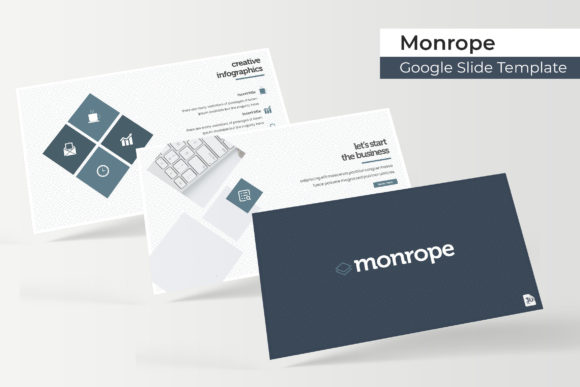
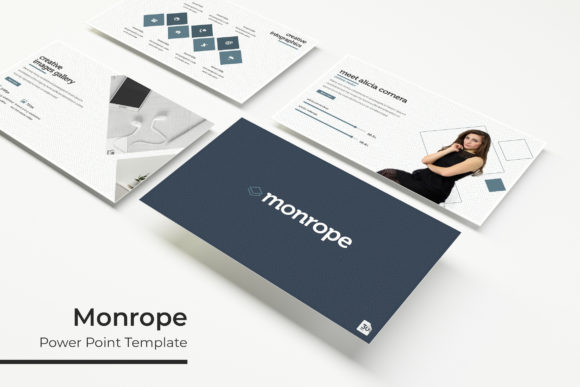
The Monrope PowerPoint Template is built on this principle. It's not just a collection of pretty slides; it's a comprehensive toolkit designed for professionals who need to communicate complex ideas with clarity and visual appeal. With over 150 total slides structured across five distinct color themes, it offers a robust starting point that can adapt to a wide range of branding scenarios and presentation needs.
A System Built for Visual Consistency
One of the biggest challenges in creating a professional presentation is maintaining a consistent look from the first slide to the last. Monrope addresses this by providing 30 meticulously designed slides for each of its five premade color variations. This structure ensures that whether you're using the sleek corporate blue, the energetic coral, or the minimalist grayscale, every element—from charts and graphs to text layouts and section dividers—harmonizes perfectly.
The inclusion of handcrafted infographics and dedicated section break slides is a game-changer. Instead of scrambling to create a flowchart or timeline from scratch, you have a library of editable graphics ready to visualize your data. The gallery and portfolio slides are particularly useful for creatives and agencies. Need to showcase a recent branding project, a product line, or a series of social media campaigns? These pre-formatted layouts let your work take center stage without the distraction of cluttered design.
Designed for the Real World of Business and Creativity
Think about how a presentation template like this integrates into the daily workflow of different professionals. For a small business owner or entrepreneur, it's a tool for creating investor pitches, team training decks, or client onboarding materials that all feel part of a unified brand identity. The consistent use of color, typography, and layout reinforces brand recognition every time you open a slide.
Marketers and content creators will find immense value in the social media and digital product slides. Imagine preparing a webinar or a workshop; the Monrope template allows you to design the entire visual narrative—from the title slide to the Q&A—ensuring your marketing assets are pixel-perfect. The resizable and editable graphic picture placeholders with drag-and-drop functionality based on master slides mean you can swap out images and text in seconds, a crucial feature when you're working on tight deadlines.
Even for designers and bloggers, this template serves a dual purpose. It can be the vehicle for presenting your own services or, because of its clean, modern aesthetic, it can inspire layout ideas for other projects like editorial design or packaging design. The underlying grid system and typographic hierarchy are lessons in modern design principles you can apply elsewhere.
Practicality Over Pure Aesthetics
A beautiful template is useless if it's difficult to use. Monrope's foundation in PowerPoint's master slide system is its most practical feature. This means global changes to fonts, colors, or logos can be made once and will cascade throughout the entire deck. No more editing the same header on 50 different slides. This focus on editability extends to the graphics; every icon, chart, and illustration is fully customizable within PowerPoint, so you're never locked into a specific style.
The package comes with everything you need to get started immediately: five PPTX files for widescreen displays, the five premade color schemes, and a readme file. A critical note for any commercial project is the font used. The template utilizes a free, widely available typeface, and the included documentation provides a direct download link. This removes the headache of licensing issues and ensures your final presentation will look exactly as intended when opened on another computer. Remember, the preview images show example photographs for illustration; the actual product provides the design framework.
Matching Your Message to the Medium
Choosing the right presentation template is like choosing the right typeface for a logo—it must align with your project's goals. The Monrope template, with its clean lines and modern layout, lends itself well to industries like tech, consulting, finance, education, and contemporary retail. It strikes a balance between being professional enough for a boardroom and creative enough for a design portfolio.
Before you dive in, consider your content. Are you presenting data-heavy financials? Use the infographic and chart-heavy slides. Are you telling a brand story? Leverage the image-centric gallery slides and section dividers to create a visual journey. The key is to view the 150+ slides not as a mandatory sequence, but as a library of design assets to be mixed and matched to construct your unique narrative.
Ultimately, a tool like the Monrope PowerPoint Template is about saving time and elevating quality. It provides the professional presentation structure so you can focus on what you do best: crafting a compelling message, building your brand, and engaging your audience. It’s a practical solution for anyone who believes that how you say something is just as important as what you say.