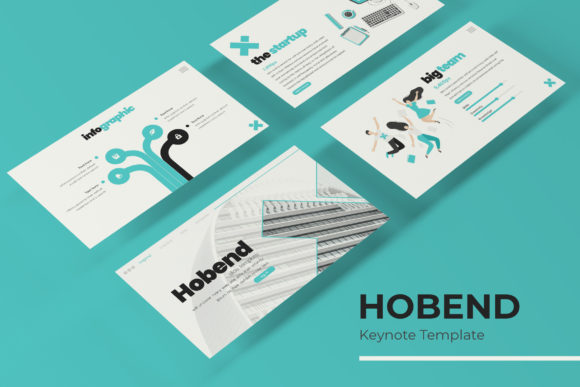
Hobend Keynote Template: A Deep Dive into Its 150+ Slide Features
You know that feeling when you're staring at a blank presentation slide, the cursor blinking back at you, and your deadline is inching closer? We've all been there. The pressure to create something that looks polished, cohesive, and engaging—without spending hours tweaking alignment or searching for the right icon—is real. That's precisely where a robust, well-structured template like the Hobend Keynote Template comes into play, not as a magic fix, but as a serious foundation for your ideas.
Let's talk about what's actually inside this package, because the details matter. With over 150 total slides built across five premade color variations, you're not just getting a single look; you're getting a versatile system. Each of the five color themes includes 30 distinct slides, which means you can switch the entire visual tone of your presentation in seconds to match a client's brand palette, a specific campaign, or the mood of your topic. This kind of flexibility is crucial for anyone working across multiple projects or clients.
More Than Just Pretty Slides: The Functional Design Elements
What sets a professional presentation apart often boils down to the small, thoughtful details. The Hobend template includes handcrafted infographics, which are a game-changer for anyone who needs to visualize data, processes, or timelines without resorting to generic, overused charts. These aren't just decorative; they're built to make complex information digestible and visually interesting.
You'll also find dedicated section break slides and a gallery/portfolio slide. The section breaks help you structure your narrative, giving your audience a clear visual pause and signaling a shift in topic. The portfolio slide is particularly useful for designers, photographers, or agencies looking to showcase work in a clean, grid-based layout directly within their pitch or review deck.
Practicality in Every Click: Editability and Usability
A beautiful template that's a nightmare to edit is essentially useless. This is where the Hobend Keynote Template focuses on real-world workflow. Every graphic is resizable and editable, and all images are set up with simple drag-and-drop placeholders. This means you can swap out a photo by just dragging your own file onto the slide—no complicated masking or cropping required.
The entire template is built on master slides. This is a fundamental feature for maintaining consistency. You can update a font, color, or logo in one place on the master, and it will propagate throughout all 150+ slides. This saves an immense amount of time and prevents those frustrating moments where you notice a mismatched font on slide 47.
The illustrations and icons are described as pixel-perfect, which means they'll look sharp and clean whether you're presenting on a small laptop screen or a large conference room projector. For anyone who has ever dealt with blurry or jagged vector graphics, you know how important this is for maintaining a professional appearance.
Who Is This Template For? Real-World Applications
Think beyond the traditional boardroom presentation. A template with this range of slides and features can be adapted for numerous creative and business purposes.
- Entrepreneurs & Startups: Perfect for crafting a compelling investor pitch deck that tells a story, using the infographics to map out market size and business models.
- Freelance Designers & Agencies: Use the portfolio slide to present design concepts to clients in a polished format. The color variations allow you to quickly mock up a presentation in the client's brand colors.
- Marketers & Content Creators: Develop social media strategy decks, campaign post-mortems, or content calendars that are visually engaging and easy for stakeholders to understand.
- Educators & Trainers: Build workshop materials or course slides that use section breaks to organize modules and infographics to explain key processes.
- Small Business Owners: Create internal training manuals, sales pitches, or even visually rich business plans that stand out from text-heavy documents.
The included file formats are PPTX for both standard and widescreen, covering the most common presentation aspect ratios. A "Readme First" file is included, which is always a good sign—it usually contains important setup instructions. They also note that the font used is free and provide a download link, which is a critical detail to avoid licensing issues later.
Making It Your Own: Tips for Customization
To get the most out of a template like Hobend, think of it as a starting framework, not a finished product. Here’s how to tailor it effectively:
First, lock in your brand identity early. Before you dive into editing slides, decide on your primary color palette, your core fonts (even if you plan to use the provided ones), and your logo placement. Use the master slides to set these foundations. This ensures every slide you create from that point forward is on-brand.
Second, don't overload your slides. The template provides structure, but the content is yours. A common mistake is trying to fit too much text onto a single slide. Use the provided layouts as a guide for balance—let the visuals and infographics do some of the heavy lifting. The goal is to support your spoken narrative, not replace it.
Third, test your font pairings and readability. Even with a provided font, check how it looks in different sizes, especially for body text versus headlines. Ensure there's enough contrast with your background colors, particularly if you're presenting in a brightly lit room. The template's clean design should aid readability, but always do a final check on a projector or large screen if possible.
Finally, leverage the portfolio and gallery slides creatively. They don't have to be just for photos. Use them to display customer testimonials, key metrics, product features, or even a visual timeline of your company's growth. The grid layout is inherently organized and can help convey a lot of information in a structured, digestible way.
Investing in a comprehensive template system is about respecting your own time and your audience's attention. It allows you to focus on your message and your story, secure in the knowledge that the visual delivery is professional, consistent, and adaptable. Whether you're closing a deal, educating a team, or showcasing your creative work, starting with a solid, well-featured foundation like this can make all the difference in how your ideas are received.