Duriat Google Slide Template: A Complete Design System
Every presenter knows the struggle. You have a brilliant idea, a compelling story, or a game-changing business proposal, but the moment you open a blank slide deck, the inspiration drains away. You find yourself fighting with text boxes, struggling to align images, and settling for generic layouts that fail to capture the energy of your content. This is where the Duriat Google Slide Template steps in, not just as a collection of slides, but as a comprehensive design ecosystem built to transform your ideas into visual narratives that command attention.
Beyond the Basic Slide Deck
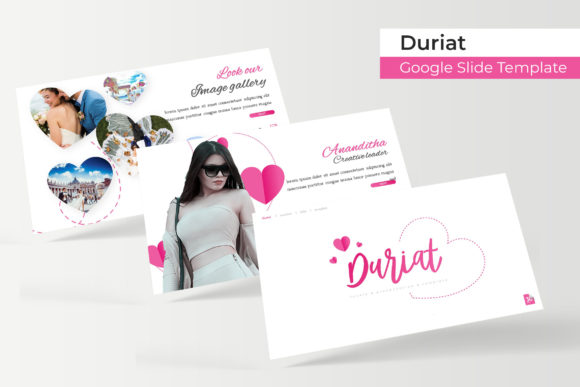
What sets the Duriat template apart is its foundation in thoughtful, professional design principles. It arrives with over 150 total slides, but the magic lies in how they are organized and presented. The system is built on five distinct, premade color themes. Each color theme isn't just a palette swap; it’s a complete visual identity, offering 30 carefully curated slides designed to work in harmony. This structure means you’re not just picking a color; you’re selecting a mood, a tone, and a complete set of visual tools tailored for specific contexts. Whether you need the clean professionalism for a corporate pitch or a vibrant, creative energy for a portfolio showcase, there’s a theme ready to go.
The visual appeal is immediate. Each slide features handcrafted infographics and pixel-perfect illustrations that feel bespoke, not stock. The design language is modern and clean, with a focus on clarity and visual impact. Section break slides provide clear visual pauses in your narrative, while dedicated gallery and portfolio slides are engineered to make your work shine. This attention to detail ensures that every element, from a simple bullet point to a complex data visualization, feels intentional and cohesive.
A Toolkit for Real-World Projects
The true value of a design asset is measured by its utility across different projects. The Duriat template excels here because it’s more than a presentation tool; it’s a versatile visual communication platform. Consider its applications beyond the boardroom:
- Brand Storytelling: Use the cohesive slide sets to build a brand presentation that tells your story from mission to market. The consistent color themes and typography help reinforce brand recognition from the first slide to the last.
- Marketing & Social Media: Break down individual slides or infographics to create stunning social media graphics, blog post headers, or digital ad assets. The high-quality design ensures your marketing materials look polished and professional.
- Client Proposals & Portfolios: The gallery and portfolio slides are perfect for creatives—photographers, designers, consultants—to showcase their work. The drag-and-drop picture placeholders make it simple to insert your visuals without disrupting the layout.
- Internal Communications: Elevate company updates, training materials, or project plans. A well-designed internal deck improves comprehension and engagement, showing your team that the information is worth their attention.
- Educational & Workshop Content: Teachers, trainers, and workshop facilitators can use the structured layouts to present information clearly and memorably. The variety of slide types accommodates different teaching styles, from lecture notes to interactive exercises.
By leveraging the Duriat Google Slide Template for these diverse needs, you build a library of visually consistent assets. This consistency is a cornerstone of strong brand identity, ensuring that whether a customer sees your pitch deck, your Instagram post, or your PDF brochure, they recognize a unified visual language.
Practical Design for the Busy Professional
One of the most significant hurdles in creating presentations is time. The Duriat template is built with efficiency in mind. Every graphic, chart, and layout is based on master slides. This means you can make a change to the master—like updating a font or adjusting a color accent—and see it reflected across all slides that use that master. This saves hours of manual editing and eliminates the risk of inconsistent formatting.
The resizable and editable graphics are another major time-saver. Need to make an infographic taller to fit more data points? Simply drag the handles. Want to change the color of an icon to match your brand? A few clicks in the slide master will do it. The drag-and-drop picture placeholders are a game-changer for anyone who isn’t a design expert. You don’t need to fuss with cropping and positioning; just drop your image into the placeholder, and it automatically fills the space perfectly, maintaining the professional layout.
This practicality extends to the package itself. The inclusion of five PPTX files (both standard and widescreen) and a clear readme file ensures you can get started immediately. The fact that it uses free, easily downloadable fonts removes another common barrier, allowing you to maintain design integrity without hunting for or purchasing additional typefaces.
Making It Your Own
While the Duriat template provides a stunning starting point, its real power is unlocked when you customize it. The five premade color schemes offer a fantastic foundation, but don’t be afraid to adapt them. Use the master slides to input your exact brand hex codes, ensuring every slide aligns perfectly with your existing visual identity. Experiment with the font pairings included in the template; the readme file will guide you to the free fonts used, but you can also explore combining them with other typefaces from your brand kit.
Think about your content goals when selecting which of the 30 slides per theme to use. Are you trying to persuade? Lead with data-driven infographics. Are you trying to inspire? Use the full-bleed image slides. Are you trying to explain a process? The step-by-step and timeline layouts will be your best allies. The template is a toolkit, and your job is to select the right tools for the job at hand.
Ultimately, the Duriat Google Slide Template is about removing the friction between your idea and its presentation. It handles the heavy lifting of design, alignment, and visual consistency, freeing you to focus on what you do best: crafting a compelling message. In a world where attention is the scarcest resource, presenting your ideas with this level of polish and professionalism isn’t just a nice-to-have—it’s a critical component of effective communication. It’s the difference between your audience remembering your message and forgetting it the moment the slides change.