Design Festive Invitations with a Christmas Poster Template
December brings a unique pressure for organizers, marketers, and small business owners. Whether you are hosting a holiday gala, a local community market, or a retail blowout sale, the visual invitation is your first handshake with the audience. A generic clip-art flyer rarely cuts it anymore; people expect professional, cohesive visuals that capture the magic of the season. This is where having a high-quality, fully editable design asset becomes a game-changer. Instead of starting from a blank canvas in Adobe Photoshop, you can utilize a robust framework that handles the heavy lifting of layout and composition, allowing you to focus purely on the message and brand alignment.
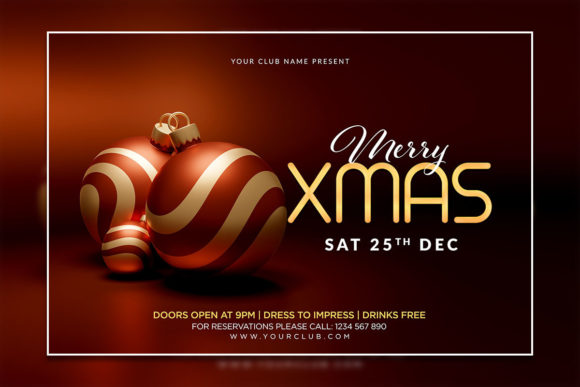
The Christmas Invitation Poster Template featured here is designed specifically for this purpose. It isn't just a static image; it is a complete design ecosystem built for customization. With a generous size of 2000 x 3000 pixels and a high 300 DPI resolution, it ensures that your final output—whether viewed on a smartphone screen or printed as a physical poster—remains crisp and professional. The RGB color mode makes it vibrant for digital use, while the quality is high enough for most standard print processes.
Unlocking the Potential of Editable PSD Files
For anyone familiar with Adobe Photoshop, the value of an organized layer structure cannot be overstated. We have all downloaded assets from the internet only to find a "flattened" image where nothing can be moved, or a chaotic mess of unnamed layers that takes an hour to decipher. This template avoids that frustration entirely. The file is organized logically, meaning text elements, background graphics, and decorative flourishes are separated. This structure allows for rapid edits.
Imagine you are a small business owner planning a "Christmas Celebration Sale." You need to get the word out fast. With this PSD file, you can open the document, select the text layer with the text tool, and type in your specific sale details—perhaps "50% Off All Winter Stock" or "Join Us for Mulled Wine and Mince Pies." If the default font doesn't match your brand guidelines, you aren't stuck. The template allows you to swap fonts easily. The help file included in the package provides download links for the specific typefaces used in the preview, but you are free to apply your own premium font or corporate typeface to maintain brand identity.
Furthermore, the visual appeal of the template leans into the festive spirit without being overly childish. It balances modern typography with traditional holiday aesthetics. This makes it versatile. It can serve as a sophisticated invite for a corporate end-of-year party or a warm, welcoming poster for a neighborhood tree lighting ceremony. The design style avoids the trap of being too "busy," ensuring that your key information remains the focal point.
Practical Applications: Beyond the Party Invite
While the name suggests a specific use case, the utility of a high-quality Christmas template extends far beyond a single event. For content creators and bloggers, this asset is a fantastic starting point for seasonal content pillars.
- Social Media Graphics: The 4:6 aspect ratio is perfect for Instagram stories or Pinterest pins. You can adapt the design to create a series of "Countdown to Christmas" posts or a holiday giveaway announcement. The visual consistency provided by using the same template family helps build a cohesive feed during the busiest shopping season of the year.
- Digital Products and Marketing: If you sell digital products, such as planners or online courses, you can use this template to create a festive "wrapper" for your email marketing campaigns. A visually appealing header image in a newsletter significantly increases click-through rates.
- Print Materials: Because of the 300 DPI resolution, the design translates beautifully to physical merchandise. Think flyers posted on community boards, table menus for a holiday pop-up cafe, or even the cover for a holiday recipe booklet.
- Editorial Layouts: If you are designing a seasonal catalog or a magazine insert, the elements within the PSD can be extracted and rearranged to fit a broader editorial design, saving hours of illustration work.
Strategic Branding During the Holidays
The holiday season is a noise-fest. Every brand is vying for attention. To stand out, your visual communication needs to be not only beautiful but also strategically sound. Using a template doesn't mean your brand looks "cheap" or "generic"—it means you are being resourceful with your time and focusing your energy on the message.
When editing your Merry Christmas Celebration Flyer Template, consider how the typography pairs with your logo. If your logo uses a heavy sans-serif font, you might want to choose a script or handwritten font for the headers in the template to create contrast and visual interest. This interplay between a display font and a functional font helps guide the viewer's eye. The headers grab attention, while the body text—clear and readable—delivers the details.
Color theory also plays a massive role here. The template likely uses traditional holiday colors (reds, greens, golds), but since you have full control over the PSD layers, you can adjust the color overlays to match your specific brand palette. If your brand is minimalist and uses cool blues and whites, you can shift the template to a "Winter Wonderland" aesthetic in just a few clicks. This flexibility ensures that your Christmas marketing assets feel like a natural extension of your brand identity, rather than a departure from it.
Technical Considerations and Workflow Efficiency
Let’s talk about the workflow. For the busy entrepreneur or the freelance designer juggling multiple clients, efficiency is currency. The "Instant Download" nature of this asset means there is no waiting for shipping or approvals. You have an idea for a promotion at 10:00 PM; you can have a finished flyer ready to post by 10:30 PM.
The inclusion of both PSD and JPG formats is also a thoughtful touch. The PSD is your workshop—where you build and tweak. The JPG is your delivery mechanism—lightweight, universally viewable, and ready for upload to Facebook, Instagram, or your website gallery. Having a help file (TXT) included removes the guesswork regarding font installation, which is often a stumbling block for those less technically inclined.
When you open the file, take a moment to explore the layers panel. A well-organized template will often group elements logically—perhaps a folder for "Background," one for "Text," and one for "Accents." Hiding or deleting layers you don't need is just as important as adding your own. If the template includes a generic "Sale" badge but you are using it for a non-commercial charity event, simply hide that layer. This "subtractive design" approach keeps your final poster clean and focused.
Maximizing Audience Engagement
Ultimately, the goal of any flyer or invitation is action. You want the recipient to attend the event, visit the store, or click the link. A professional design builds trust. When a potential customer sees a pixelated, poorly aligned flyer, they subconsciously question the quality of the business behind it. Conversely, a sharp, high-resolution design with thoughtful typography signals competence and care.
Use the space provided in the template to be direct. Use strong verbs. "Join Us," "Shop Now," "Celebrate Together." Ensure that your contact information—website, address, or phone number—is legible against the background. If you are using this for a digital campaign, consider adding a QR code layer (which you can create separately and paste into the PSD) to bridge the gap between print and digital engagement.
This Christmas season, don't let design bottlenecks slow you down. By leveraging a high-quality, fully editable template, you can produce stunning visual content that resonates with your audience, reinforces your brand identity, and drives real-world results. Whether it is a grand celebration or a simple seasonal greeting, the right design framework empowers you to communicate with clarity and style.