Atomizer Power Point Template: A Complete Design Toolkit
Imagine walking into a crucial investor pitch or a high-stakes client presentation with slides that look like they were designed by a top-tier creative agency. The difference between a forgettable meeting and a closed deal often lies in the visual narrative you present. This is where the Atomizer Power Point Template steps in, bridging the gap between amateur hour and professional storytelling. It is not merely a set of slides; it is a comprehensive visual communication system designed for professionals who value their time and reputation. With over 150 total slides and a sophisticated design language, Atomizer provides the structure and aesthetic flair needed to captivate an audience, ensuring your data and ideas are not just seen, but felt.
A Visual System Built for Speed and Polish
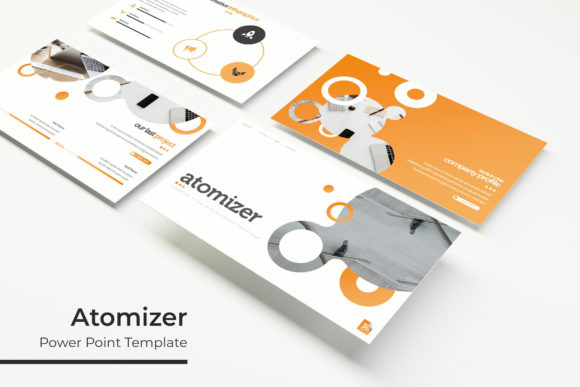
One of the most significant hurdles in presentation design is maintaining visual consistency while working under tight deadlines. Atomizer solves this by offering five premade color variations, with 30 distinct slides dedicated to each palette. This modular approach allows entrepreneurs and marketers to select a color scheme that aligns with their existing brand identity instantly. Whether you are pitching a sleek tech startup or a vibrant lifestyle brand, the color options provide a ready-made foundation. The inclusion of section break slides is a subtle but powerful feature; these act as visual pauses, helping your audience digest information before moving on to the next segment of your narrative.
Beyond the color variations, the template focuses on functionality. The slides are built upon Master Slides, a feature that ensures global changes can be made efficiently. If you need to adjust a font size or shift a logo placement, you can do so once, and it updates across the entire deck. This pixel-perfect engineering saves hours of manual tweaking. For the busy content creator or small business owner, this efficiency is invaluable. It allows you to focus on the content of your message rather than wrestling with alignment tools or inconsistent formatting.
Infographics and Visual Storytelling
Data visualization is often the weak point of many presentations. Raw numbers in spreadsheets rarely inspire action. The Atomizer template addresses this with handcrafted infographics that transform complex data into digestible visual stories. These are not generic clip-art shapes; they are designed to illustrate processes, hierarchies, and statistics with clarity. For instance, a marketing team presenting quarterly growth can use these infographics to highlight trends visually, making the information more memorable for stakeholders.
The versatility of these graphics extends to other aspects of your brand ecosystem. While designed for PowerPoint, the visual language of these infographics can inspire assets for social media graphics or website charts. A graphic designer might extract a specific element from the presentation to create a cohesive look for a blog post or an editorial layout. This cross-platform potential makes Atomizer more than just a presentation tool; it becomes a source of visual assets for your broader marketing strategy.
Practical Applications Across Industries
The utility of the Atomizer Power Point Template spans a wide array of professional needs. It serves as a robust tool for branding presentations, where visual consistency is paramount. When presenting a new brand identity to a client, the template’s clean lines and professional typography allow the logo design and color palettes to take center stage without distraction. The gallery and portfolio slides are particularly useful here, offering structured layouts to showcase previous work or product mockups.
For those in packaging design or product development, the template offers a stage to present physical goods. You can use the picture placeholders to drag and drop images of your prototypes, allowing you to simulate how your product might look in a retail environment. This is crucial for securing buy-in from stakeholders who need to visualize the end result. Similarly, for web design agencies, the widescreen format provides a canvas to mock up user interfaces or walk clients through site architecture before a single line of code is written.
Educational institutions and corporate trainers also find immense value in this structure. The 150+ slides provide enough variety to build comprehensive training modules without repeating visual patterns. The readability of the design ensures that information is accessible, reducing cognitive load for the audience. Whether you are a freelancer pitching a new service or a corporate manager presenting annual results, the template adapts to the context.
Customization and Technical Flexibility
A key feature that sets Atomizer apart is its emphasis on user control. The resizable and editable graphic elements mean that you are not locked into a rigid design. If a specific icon or diagram does not fit your narrative, you can resize it or edit its components to better suit your needs. The drag & drop functionality for picture placeholders is a standout feature for those who are not design experts. It simplifies the process of incorporating high-quality imagery, which is essential for modern visual communication.
The package includes five PPTX files in widescreen format, ensuring compatibility with modern display standards. The inclusion of a "Readme First" file and links to free fonts demonstrates a thoughtful approach to user experience. Typography is often a sticking point in template usage; if a user opens a file and sees missing fonts, the design can break. By providing free font download links, Atomizer ensures that the typographic integrity of the design remains intact from the moment you open the file. This attention to detail reinforces the pixel-perfect quality promised in the features.
Integrating Atomizer into Your Workflow
Adopting a new design asset requires a shift in workflow. To get the most out of the Atomizer template, it is helpful to view it as a starting point rather than a finished product. Start by selecting the color variation that best matches your current project’s mood. Next, review the section break slides to outline your presentation’s structure. This top-down approach helps in organizing your thoughts logically before diving into the details.
When populating the slides, pay attention to the balance between text and imagery. The template is designed with white space in mind, which is a critical component of professional design. Resist the urge to fill every corner with text. Instead, use the provided layouts to let your content breathe. For social media graphics, consider exporting specific slides as images. A well-designed quote slide or a statistic highlight can be repurposed as an Instagram post or a LinkedIn update, extending the life of your presentation content.
Finally, remember that the template is a tool for visual communication. While the aesthetics are important, the primary goal is to convey a message. The Atomizer Power Point Template provides the structure and polish, but the narrative power comes from you. By combining this robust design system with your unique insights and data, you create a presentation that is not only visually stunning but also strategically effective. It is an investment in your professional image, ensuring that every time you present, you do so with confidence and clarity.